
MP Bhulekh - WebGis 2.0, Khasara Khatauni 2026
Madhya Pradesh launched the upgraded MP Bhulekh WebGIS 2.0 portal, replacing the older system and bringing faster performance. This platform provides instant access to digitized land records for over 1.5 crore parcels across 55 districts.
Key Features:
- ULPIN Integration: Unique 14-digit Land Parcel IDs for national interoperability, enabling cross-state verifications.
- GIS-Enhanced Mapping: Bhunaksha's WebGIS v2.1 with ISRO satellite overlays for 98% boundary accuracy.
- Mobile-First Design: App v2.2 with offline caching, voice queries in Hindi/Malvi, and NFC-QR validation for field use.
- Secure Archival: Blockchain timestamps on PDFs, ensuring tamper-proof certified copies with e-Sign compatibility.
- Inter-Service Linkages: Auto-sync with e-District for mutations, grievances, and revenue payments.
Key Services
MP Bhulekh offers a mix of free and paid services:
- Bhu-Abhilekh — Core land records (Khasra/Khatauni details).
- Land Parcel Map — Interactive Bhunaksha GIS maps.
- Aabadi Adhikar Abhilekh — Settlement rights records.
- Record Room Document (Scan) — Scanned old documents.
- RCMS Order — Revenue court mutation orders.
- Civil Court Case — Land-related civil court cases.
- Transaction Details — Payment and transaction history.
- Re-assessment (Diversion) — Land use diversion intimation and fee calculator.
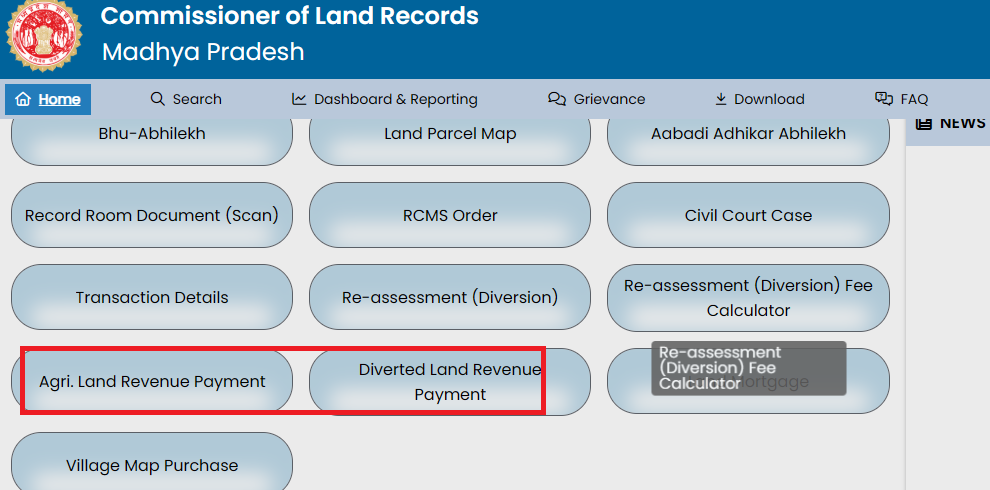
- Agri. Land Revenue Payment — Agricultural land revenue dues payment.
- Diverted Land Revenue Payment — Revenue for diverted (non-agri) land.
- Land Mortgage — Register/release land hypothecation.
- Village Map Purchase — Buy certified village maps.
Documents Required
For Free Viewing Services: No documents or registration required, completely public access.
For Certified Copies, Mutations, Corrections, or Diversions:
- Aadhaar card (for e-KYC and verification).
- Sale/gift deed, will, or court order (for ownership transfers).
- Death certificate (for inheritance claims).
- Bank release certificate (to clear mortgages/hypothecations).
- No Objection Certificate (NOC) from co-owners/heirs.
- Affidavit for name/address corrections.
- Previous Khasra/Khatauni copies.
- Revenue payment receipts (if dues pending).
Note: Scanned copies for online; originals may be needed for tehsil verification.
Steps for the Important Services
WebGIS 2.0 serves as the primary portal. Login enhances features like payments and applications.
Registration and Login
- Visit https://webgis2.mpbhulekh.gov.in/.
- Click "Register" for new users or "Sign In" for existing ones.
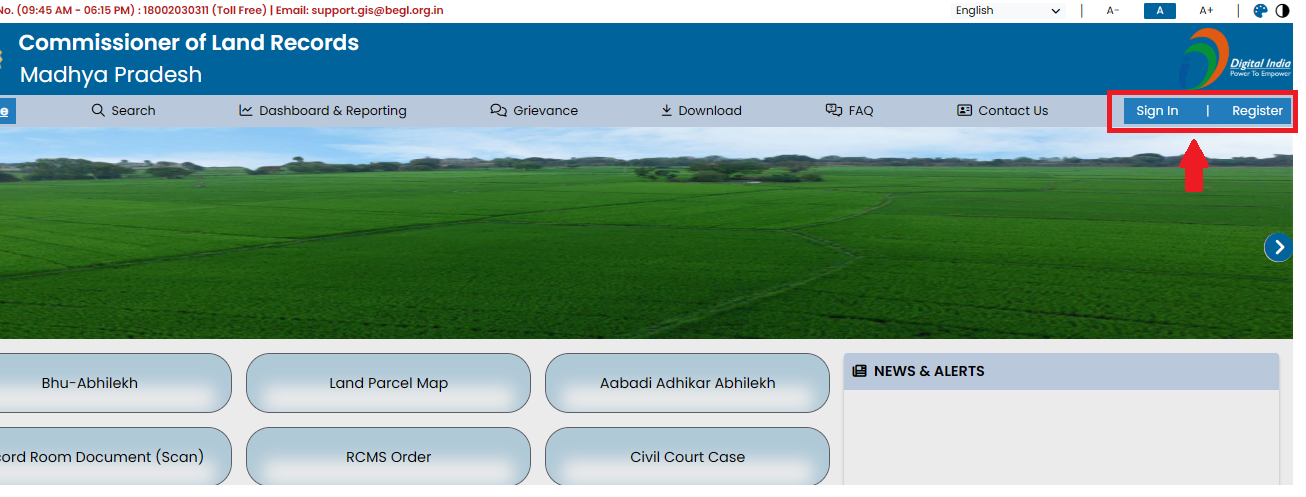
- If registering, you can register as a citizen user and follow ahead.
- Enter mobile number or email, receive OTP, and verify.
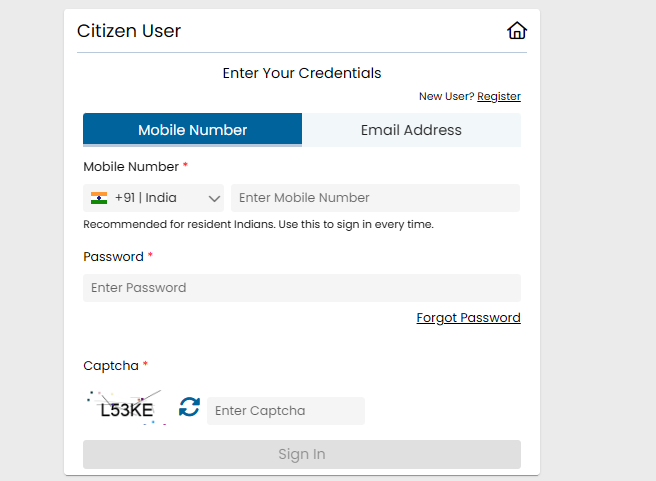
- Complete profile with name and other details if registering.
- Dashboard loads with Madhya Pradesh overview including districts, villages, and land stats.
1. Searching and Viewing Land Records (Bhu-Abhilekh – Khasra and Khatauni Details)
- After login or as a guest, select "Bhu-Abhilekh" from the menu.
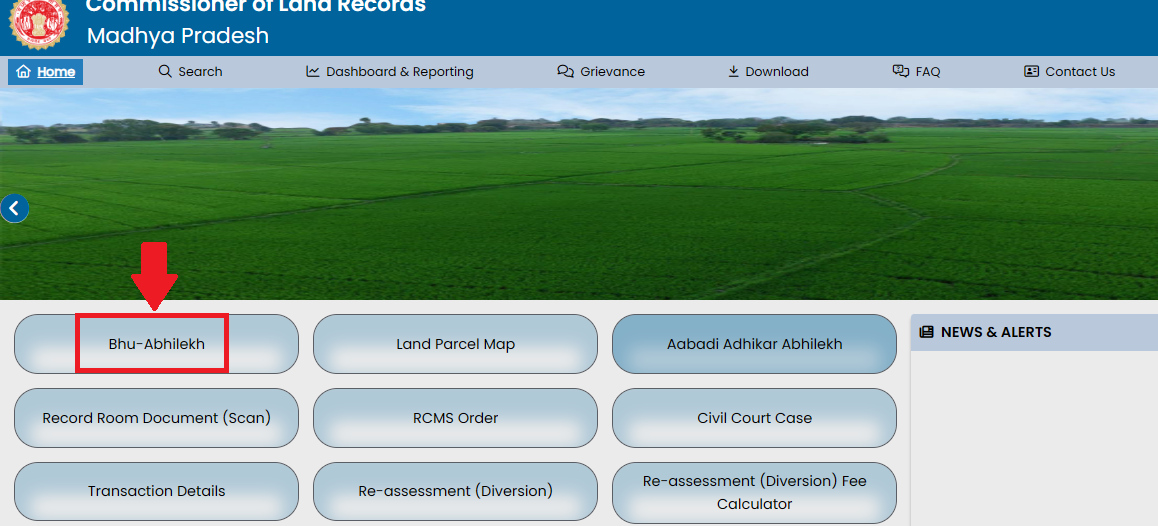
- A pop-up appears, choose between from searching the land records for Khasra and receiving the digitally signed Khasra copy
- Enter the land parcel Id, ULPIN and then choose District, then Tehsil, then Village.
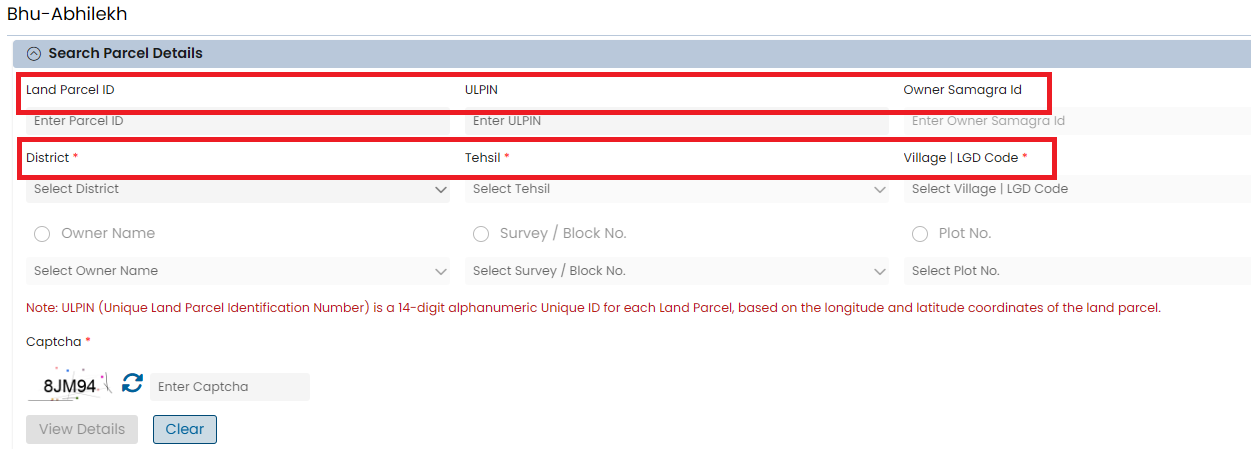
- Search by Owner Name with father's name or by Survey and Khasra Number.
- Enter details, solve CAPTCHA, and click "View Details."
- Owner info appears with e-KYC status, charges, court cases, and transactions.
- Scroll to land list and under "Action" click "View Khasra," "View Map," or "View Khatauni."

- Sample PDF opens as free informational copy.
2. Viewing Land Parcel Map (Bhunaksha)
- Select "Land Parcel Map" from the menu or from search results click "View Map."
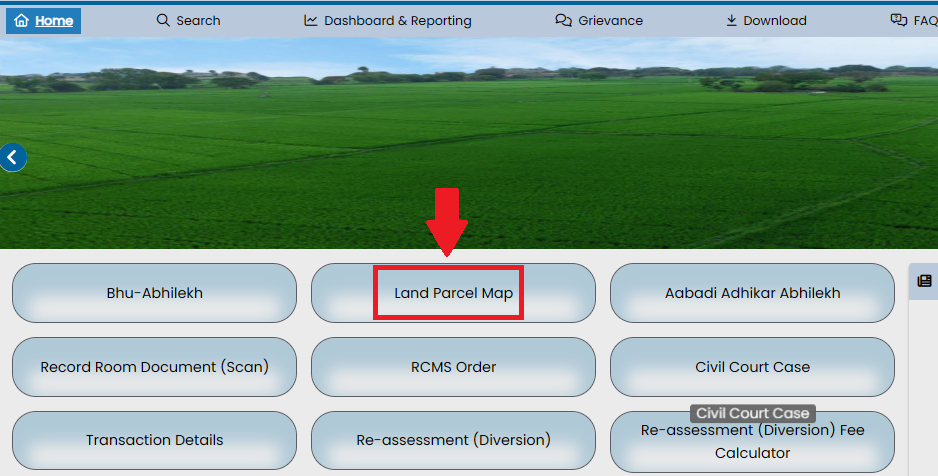
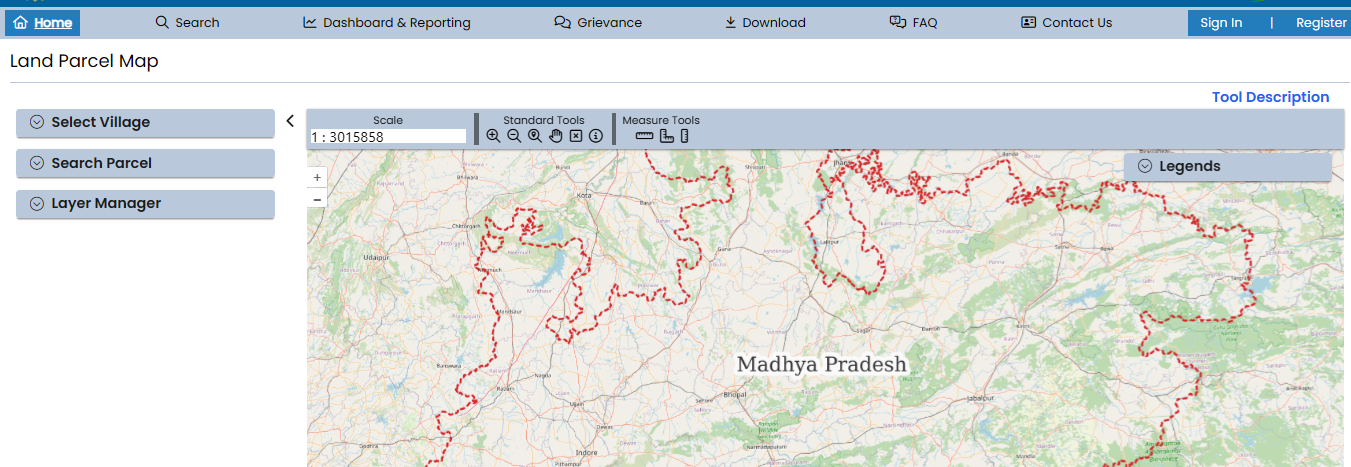
- Interactive GIS map loads. Zoom and toggle layers for boundaries, roads, or irrigation.
- Use measure tools and export or print as a free view.
3. Searching Aabadi Adhikar Abhilekh (Habitation/Settlement Rights Records)
This service provides ownership details for urban/residential (aabadi) land parcels.
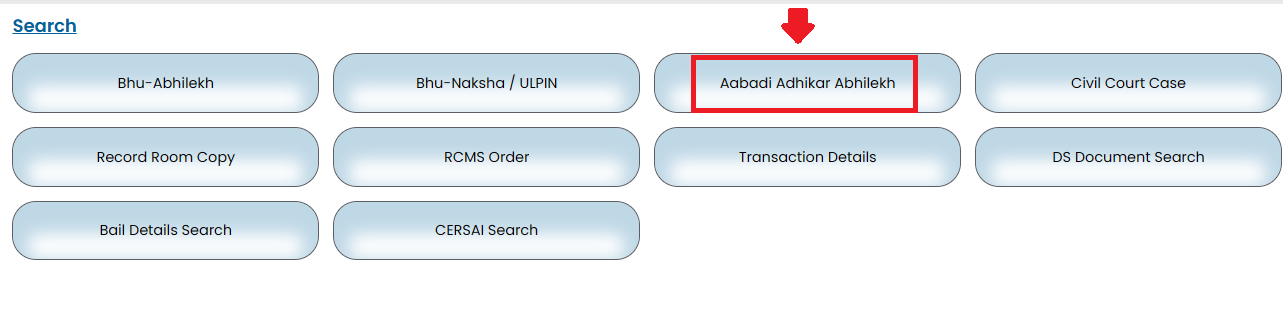
- Select "Aabadi Adhikar Abhilekh" from the main menu.
- The search form appears. Fill mandatory fields: Select District, Tehsil, and Village | LGD Code from dropdowns.
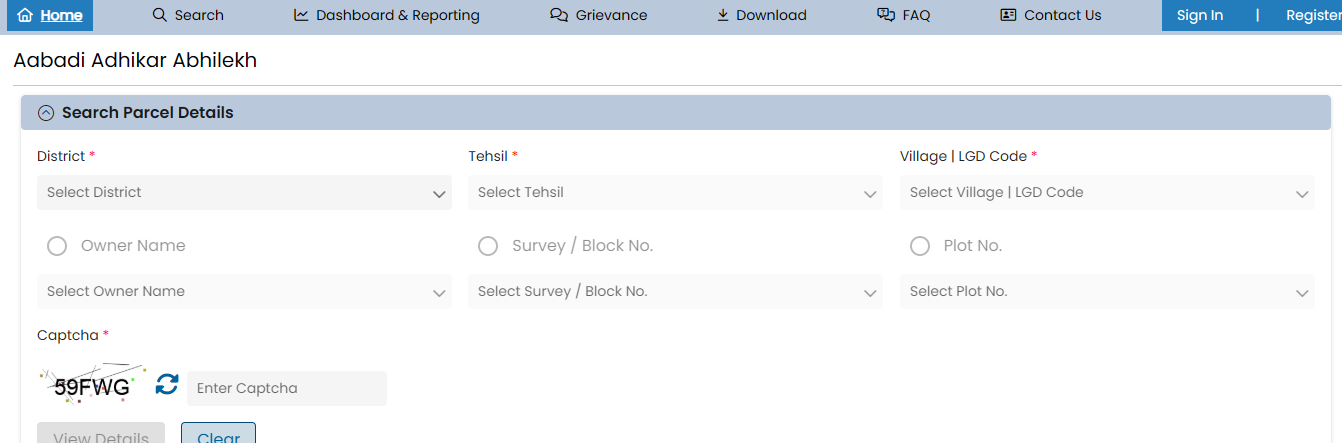
- Choose the search method: Owner Name, Survey/Block No., or Plot No.
- Enter the corresponding details (e.g., select or type Owner Name, Survey No., or Plot No.).
- Enter the Captcha text exactly as shown.
- Click "View Details."
- Matching habitation rights records display (ownership, plot info in settled areas).
- View or print informational copy (free); for certified, proceed to paid application.
4. Apply for Modern Record Room Copy
- Visit the MP Bhulekh WebGIS 2.0 portal at https://webgis2.mpbhulekh.gov.in/.
- Log in using your registered mobile number or email (receive OTP and verify). Registration is quick if you are new.
- The "Modern Record Room Copy" page opens with the "Search Parcel Details" form.
- Fill in the mandatory fields marked with:
- District: Select your district from the dropdown.
- Tehsil: Select the tehsil (dropdown updates after district).
- Village | LGD Code: Select the village (Local Government Directory code dropdown updates after tehsil).
- Document Type: Choose the required document from the dropdown (e.g., Khasra, Khatauni, Mutation Order, etc.).
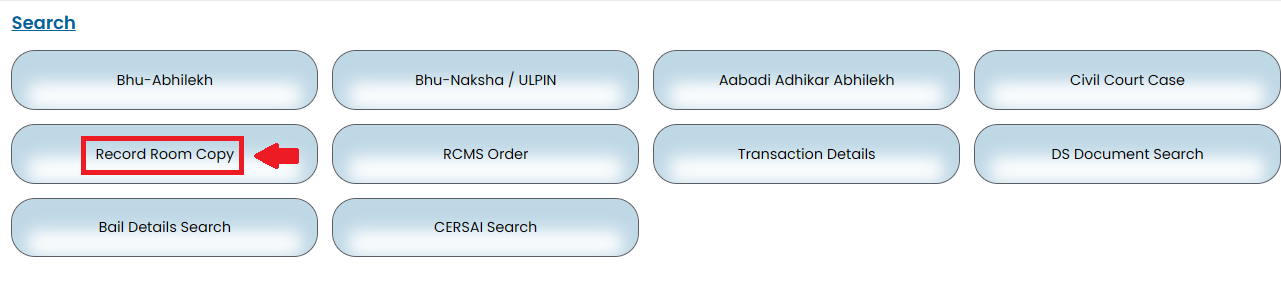
From the main dashboard menu (rounded buttons), select Record Room Scan
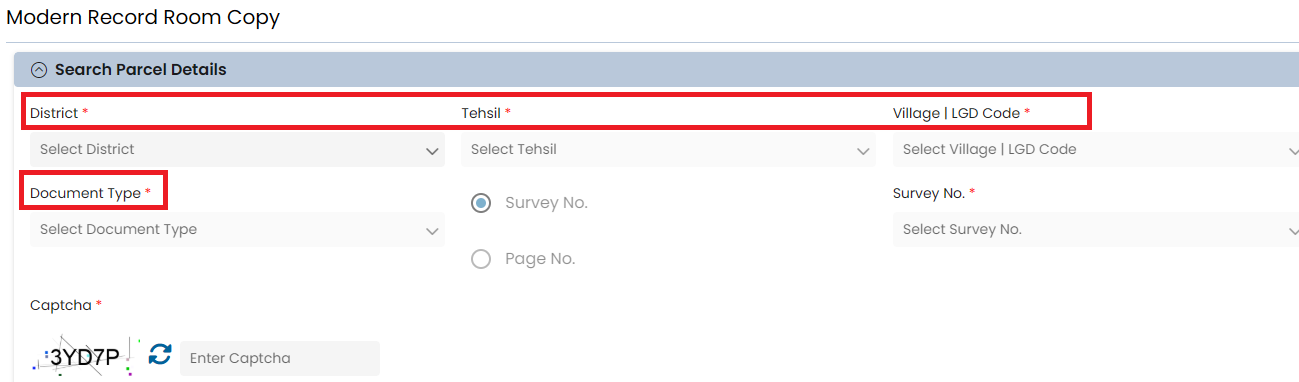
- Choose the search method:
- Select Survey No. (most common) and pick or enter the Survey/Khasra number.
- Or select Page No. if you know the exact page in the old register.
- Enter the Captcha text exactly as displayed (case-sensitive; refresh if unclear).
- Click Search or View Details.
- Matching records appear. Preview the document if available.
- Select the desired document(s)/year/page, add to cart/list.
- The system calculates the fee (usually ₹30+ based on pages/type).
- Proceed to payment via UPI, netbanking, or QR code.
- After successful payment, the digitally signed certified PDF becomes available in your dashboard for download (typically within minutes to hours) or is delivered via WhatsApp/email.
5. Search RCMS Order Details
- Visit the MP Bhulekh WebGIS 2.0 portal at https://webgis2.mpbhulekh.gov.in/.
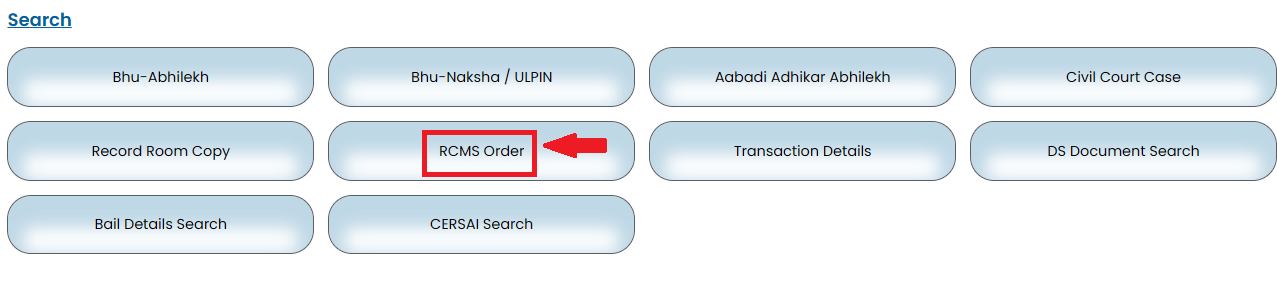
- From the main menu (the rounded buttons), select RCMS Order.
- The "Search RCMS Order Details" page opens. Select one or more search filters using the radio buttons:
- RCMS Application No. (recommended and marked as required, enter the full application number).
- Revenue Court Name.
- Survey No. (Khasra number).
- Order Date.
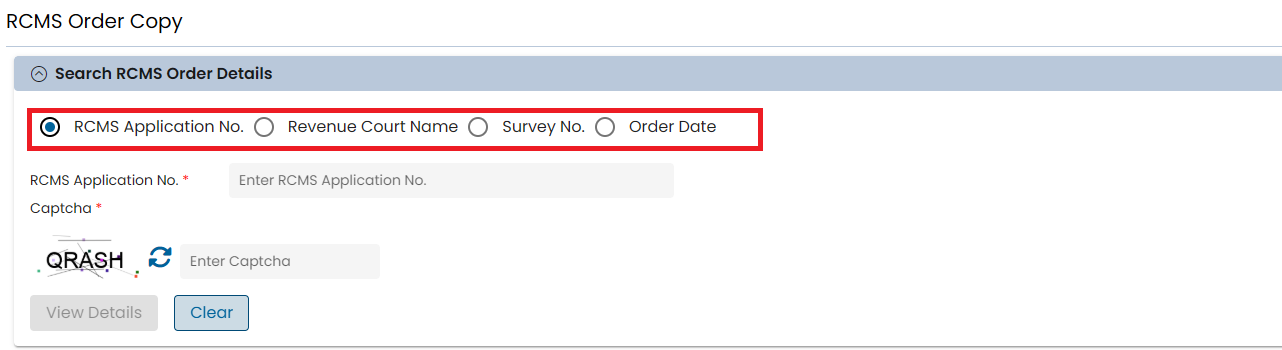
- Fill in the details for your chosen filter(s):
- For RCMS Application No., type the number in the provided field.
- Enter the Captcha text exactly as shown (case-sensitive; refresh if unclear).
- Click the blue View Details button.
- If a matching order exists, the details display (including order PDF/view option if available).
6. Paying Land Revenue (Agricultural or Diverted)
- Login and select "Agri. Land Revenue Payment" or "Diverted Land Revenue Payment."
- Enter District, Tehsil, Village, and Khasra or Owner.
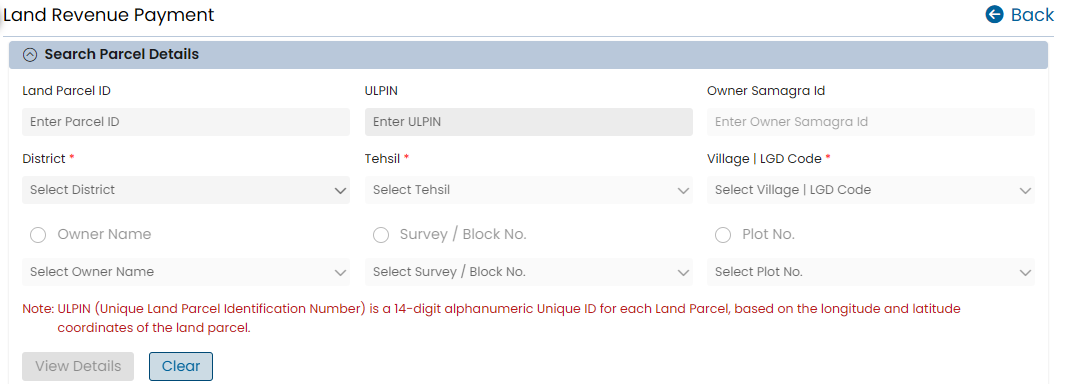
- View Details to see pending dues across multiple years.
- Select years, Add to List, Proceed, and pay online.
- Receipt generates instantly.
7. Diversion Intimation and Fee Calculator
- Login and select "Re-assessment (Diversion)” and then click on Re-assessment (Diversion) Fee Calculator
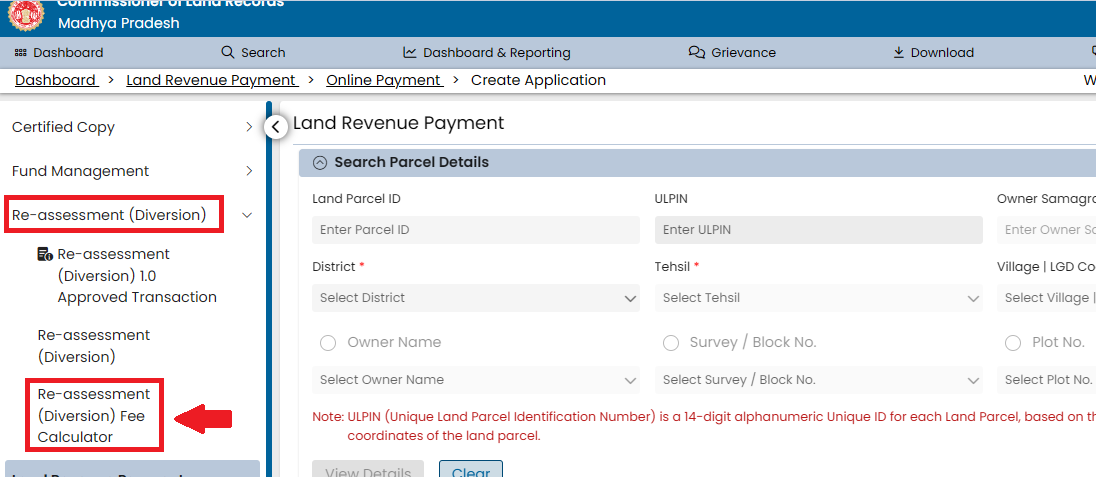
- Fill form with Khasra and proposed use, use fee calculator if needed.
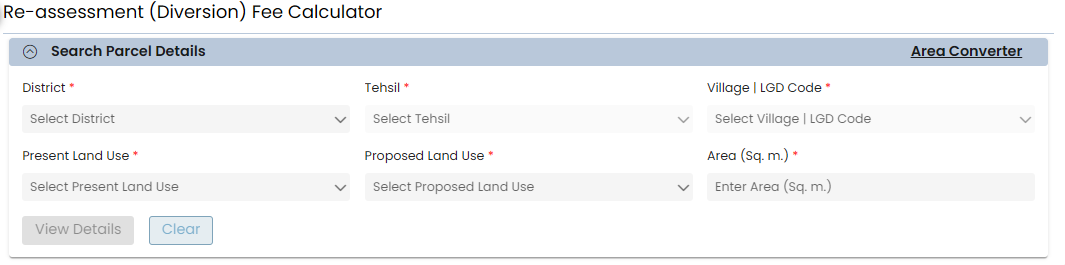
- Upload an affidavit if required and submit.
- Track status in dashboard.
Helpline
| Field | Details |
|---|---|
| Organization | Commissioner Land Records, Government of Madhya Pradesh |
| Address | Revenue Building, Naka Chandrabadni, NeeDam Road, Gwalior, Madhya Pradesh |
| PIN Code | 474009 |
| Toll Free | 18002030311 |
| Landline | 0751-2441200 (CLR Office, Gwalior) |
| clrgwa@mp.nic.in |