
IGRSUP - Stamp And Registration Department, Uttar Pradesh
The Integrated Grievance Redressal System of Uttar Pradesh (IGRSUP), accessible at https://igrsup.gov.in/, is a state-of-the-art online portal designed to modernize and simplify property and registration services.
Overseen by the Inspector-General of Registration and Stamps, IGRSUP facilitates a wide range of services, including property registration, encumbrance certificate issuance, stamp duty management, and marriage registration.
Features of IGRSUP
IGRSUP is equipped with a robust set of features to cater to diverse needs:
- Property Registration: Enables online registration of property documents, simplifying the process for buyers and sellers.
- Evaluation List Check: Allows verification of property evaluation lists for accurate transactions.
- Application Status Tracking: Enables users to monitor the progress of submitted applications.
- Stamp Duty Withdrawal: Facilitates applications for stamp duty refunds, a recent addition as of 2025.
- Certified Copies of Registered Instruments: Allows users to request certified copies of documents.
- Industrial Property Registration: Available through the Nivesh Mitra portal at http://niveshmitra.up.nic.in/.
- Encumbrance Certificate: Online application for certificates verifying property liens.
- E-stamp Certification: Supports certification of e-stamps for transactions.
- Mutation of Land Records: Provides access to rate lists at https://e-nagarsewaup.gov.in/ulbappsmain/mutationRate.
- Marriage Registration: Facilitates online registration of marriages.
These features make IGRSUP a comprehensive platform for managing property and registration needs.
Eligibility Criteria
IGRSUP services are designed to be inclusive, with eligibility criteria varying by service:
- Property Registration: Open to individuals, businesses, or investors buying or selling property in Uttar Pradesh.
- Marriage Registration: Available to couples residing in Uttar Pradesh who meet legal requirements for marriage registration (e.g., age, consent).
- Encumbrance Certificate: Accessible to property owners, buyers, or authorized representatives needing to verify property status.
- Stamp Duty Refund: Available to those who have paid stamp duty but are eligible for refunds due to transaction cancellations or errors.
- Industrial Property Registration: Targeted at investors and industrialists registering properties via Nivesh Mitra.
- General Services: Most services are available to Uttar Pradesh residents or authorized representatives with valid documentation.
Users should verify specific eligibility requirements on the IGRSUP portal or with local authorities.
Documents Required
The documents required for IGRSUP services depend on the specific service. Below is a detailed list of commonly required documents:
| Document | Purpose | Service Applicability |
|---|---|---|
| PAN Card | Identity verification | Property, Marriage, Stamp Refund |
| Aadhaar / Other ID Proof | Proof of identity and address | All Services |
| Sale Deed | Legal proof of property sale | Property Registration |
| Khata Certificate | Ownership & tax details | Property Registration, Encumbrance |
| Encumbrance Certificate (EC) | Verifies no liens | Property Registration, Encumbrance |
| Property Title Deeds | Proof of ownership | Property Registration |
| Property Tax Receipts | Proof of paid taxes | Property Registration |
| Property Survey Plan | Boundaries & measurements | Property Registration |
| Stamp Duty Receipt | Proof of stamp duty payment | Property Registration, Stamp Refund |
| No Objection Certificate (NOC) | From authorities/banks (if applicable) | Property Registration |
| Affidavits/Declarations | Legal statements | Property, Marriage |
| Bank NOC | If property is financed | Property Registration |
| Power of Attorney | Acting on behalf of owner | Property Registration, Encumbrance |
| Occupancy Certificate | For new constructions | Property Registration |
| Marriage Proof | Marriage certificate or affidavit | Marriage Registration |
Steps for Key IGRSUP Services
Below are step-by-step guides for the most important IGRSUP services, ensuring users can navigate the portal effectively.
1. Property Registration
Property registration through IGRSUP involves documenting property transactions and paying applicable fees.
- Access the Portal: Visit https://igrsup.gov.in/.
- Log In or Register:
- Select Property Registration: Navigate to (Property Registration under the citizen services menu and click on Apply now.
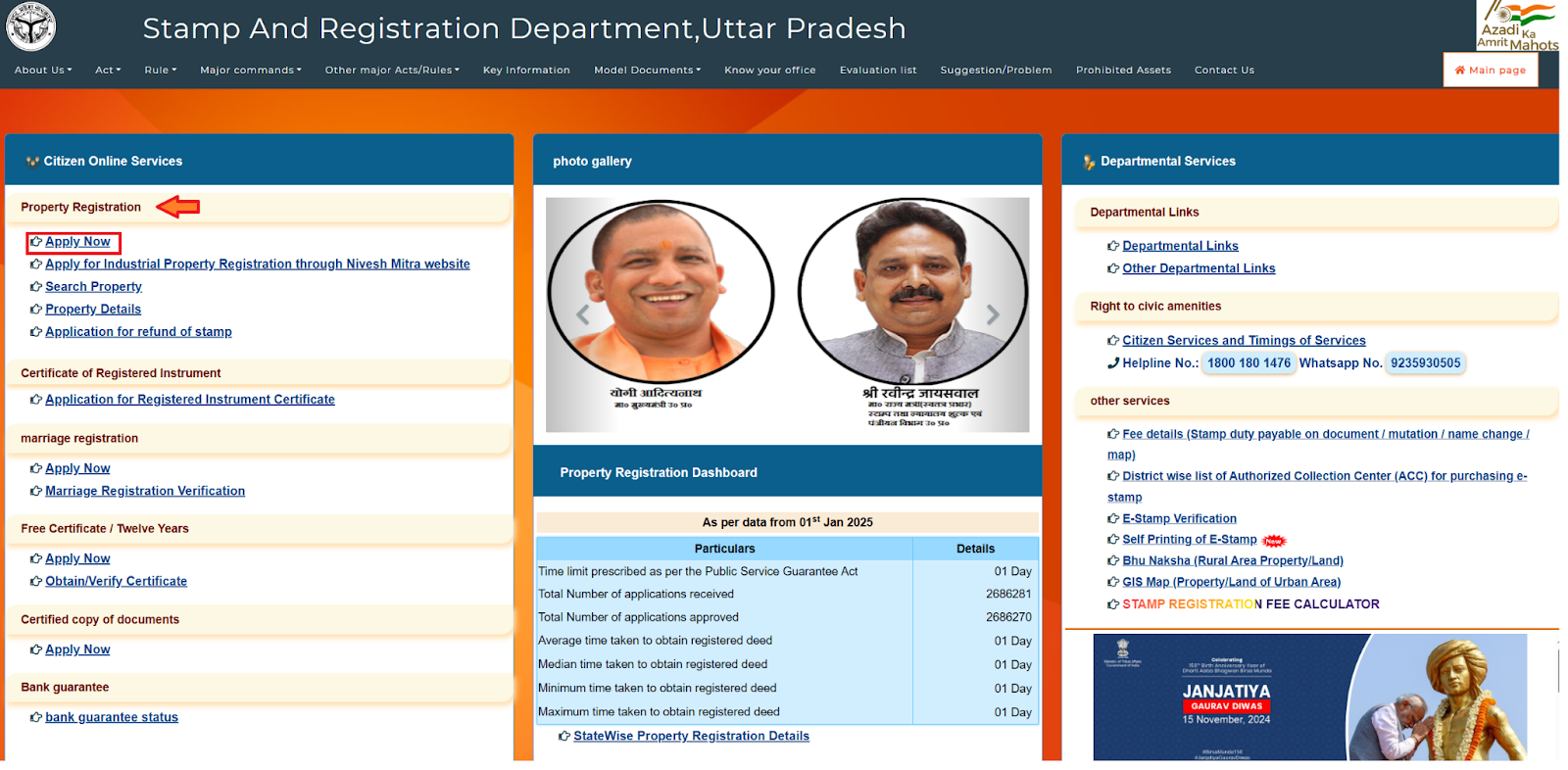
- Click 'Login' on the homepage.
- Existing Users: Enter user ID (mobile number or email) and password. Verify with captcha
- New Users: Click 'New User Registration', provide name, mobile number, set a password (minimum 8 characters, letters, numbers, special characters), and submit. Receive a confirmation with your application ID.
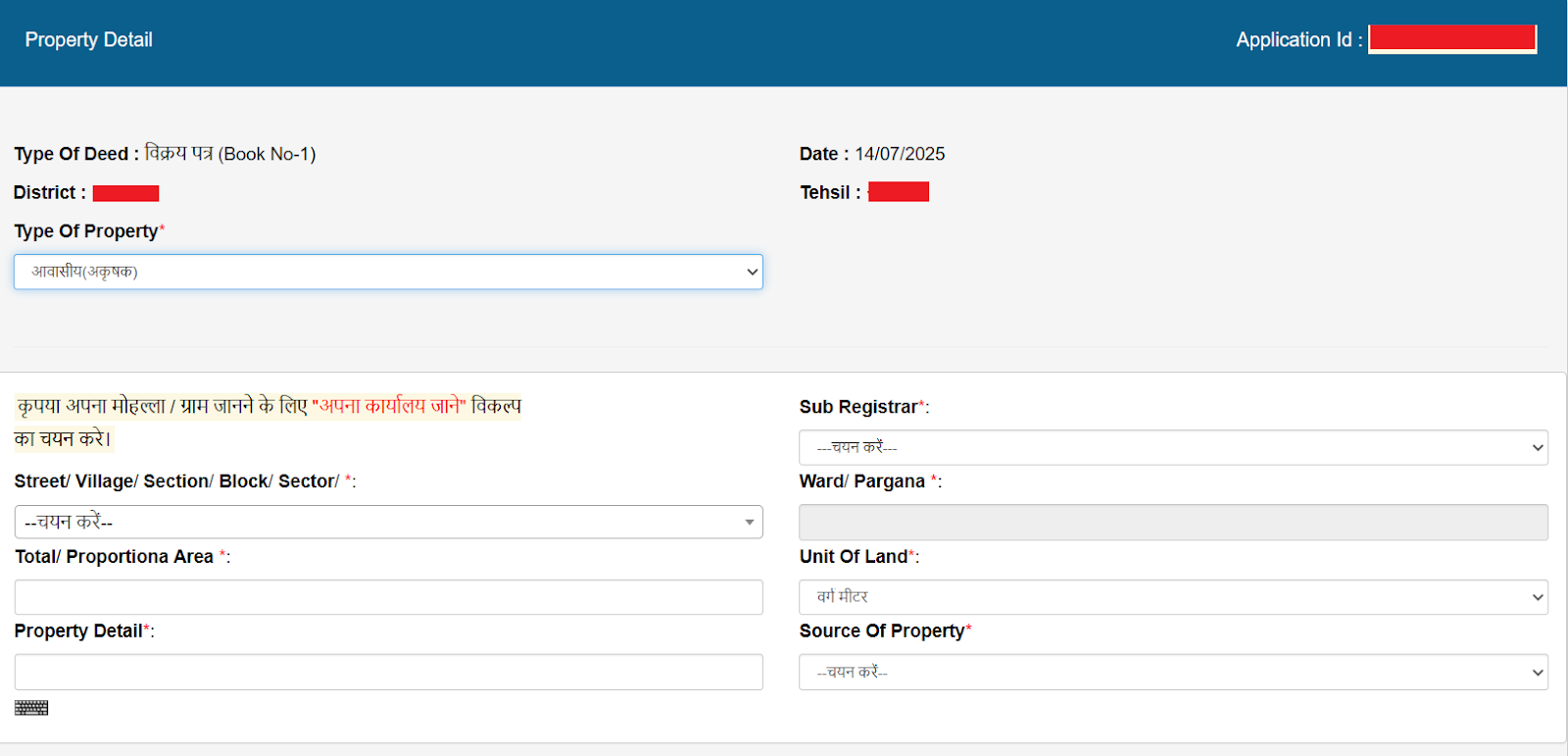
- Enter Property Details: Provide details such as property location, type (urban/rural), and transaction value.
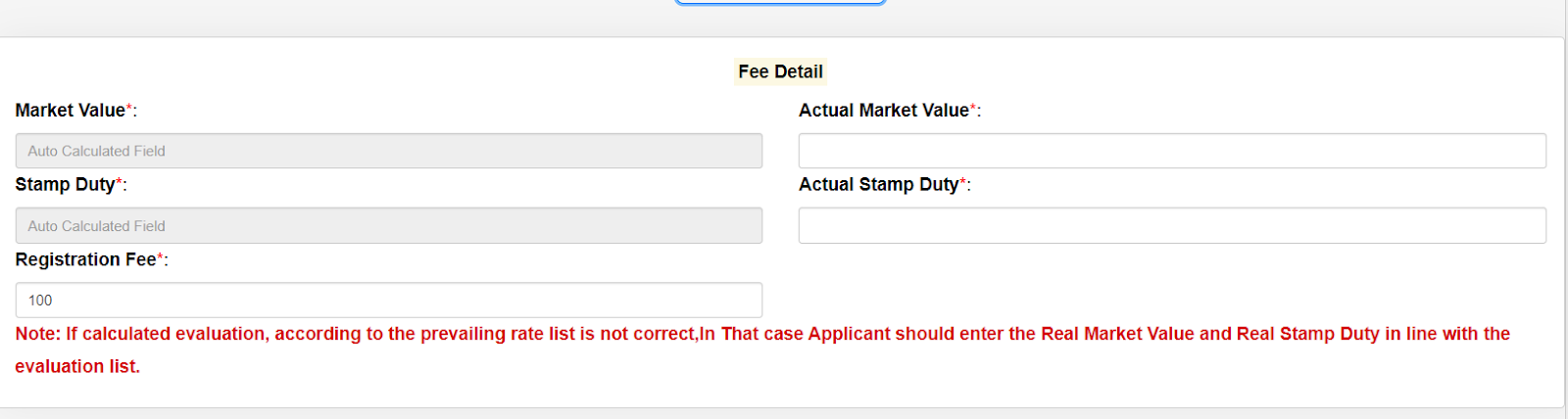
- Calculate Fees: Use the stamp duty calculator at [/stamp-duty-calculator] to determine stamp duty (7% of circle rate) and registration fees (1% of circle rate, capped at ₹30,000 as of 2025).
- Generate Payment Challan: Create a challan for the calculated fees.
- Choose Payment Method: Select online payment options (credit/debit card, net banking) or verify with the sub-registrar for offline methods (e.g., cheque).
- Upload Documents: Submit scanned copies of required documents (e.g., sale deed, PAN card, Aadhaar, property tax receipts).
- Make Payment: Complete the payment and download the receipt.
- Schedule Appointment: Book an appointment with the sub-registrar office, if required, for physical verification.
- Finalize Registration: Submit the application online or at the sub-registrar office.
- Collect Registered Documents: Retrieve documents from the portal or office once approved.
2. Applying for an Encumbrance Certificate / Twelve Years
An Encumbrance Certificate / Twelve Years certificate verifies that a property is free from legal or financial liabilities.
- Access the Portal: Go to https://igrsup.gov.in/.
- Navigate to Service: Under 'Citizen Online Services', click 'Encumbrance Certificate / Twelve Years' and then click on apply now for a new application or log in to view an existing one.
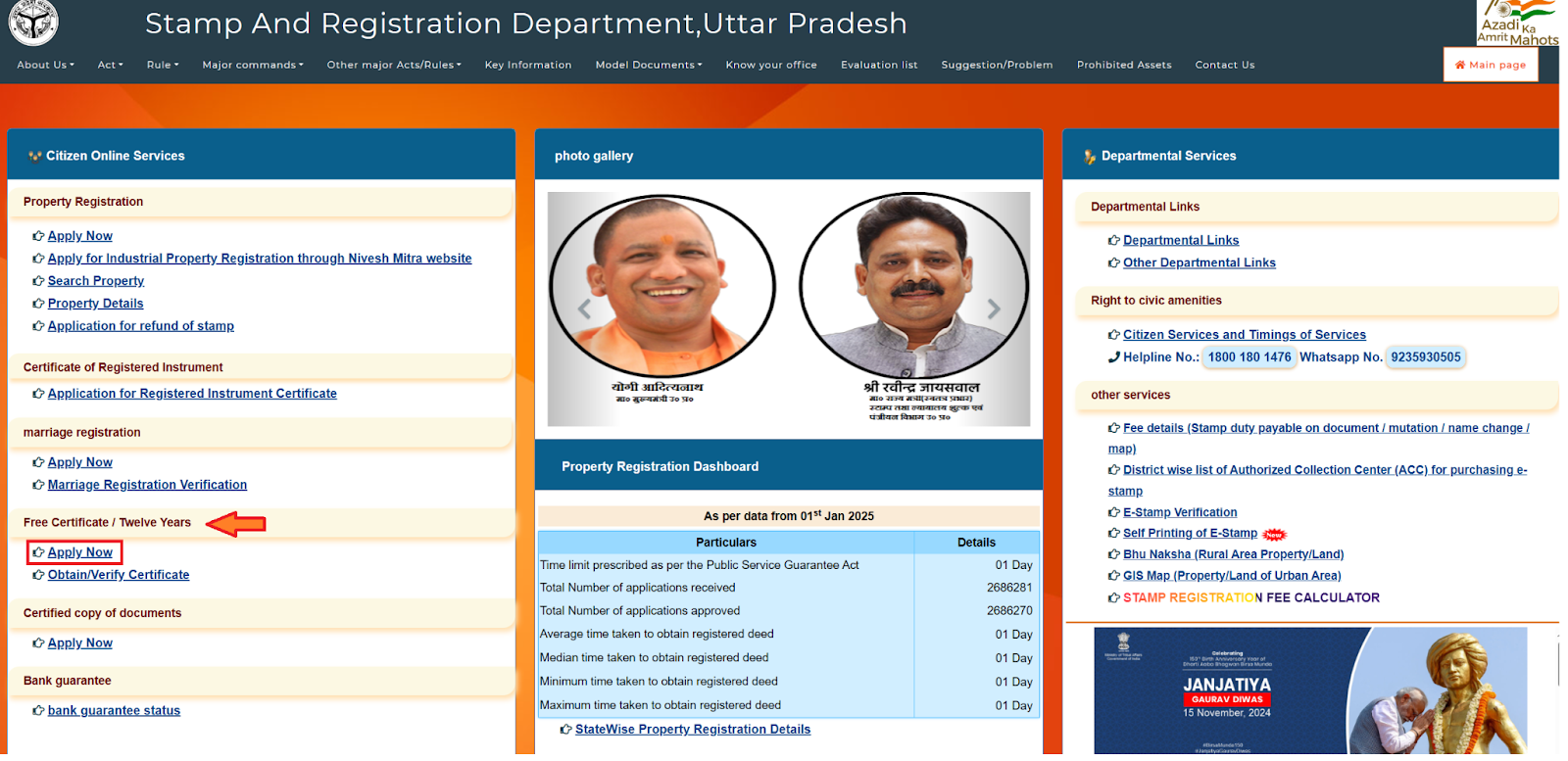
- Fill Application: Enter property details (location, survey number, period).
- Upload Documents: Submit identity proof, property title deeds.
- Pay Fees: Pay ₹100–₹500 (district-dependent) online.
- Submit: Review and submit.
- Receive Certificate: Download or collect from the sub-registrar office.
3. Applying for a Stamp Duty Refund
Stamp duty refunds are available for cases where transactions are cancelled, or excess duty is paid.
- Access the Portal: Visit https://igrsup.gov.in/.
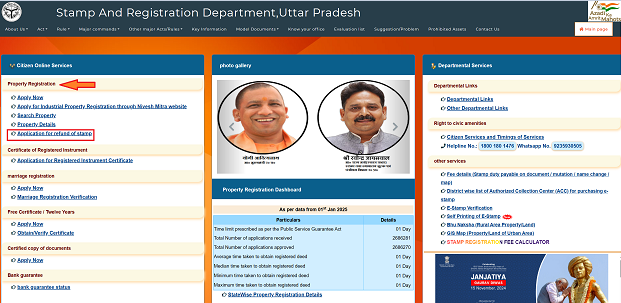
- Locate the Service: Find Application for refund of stamp on the left-hand menu.
- Select Application Option: Choose to create a new application or log in to view/modify an existing one.
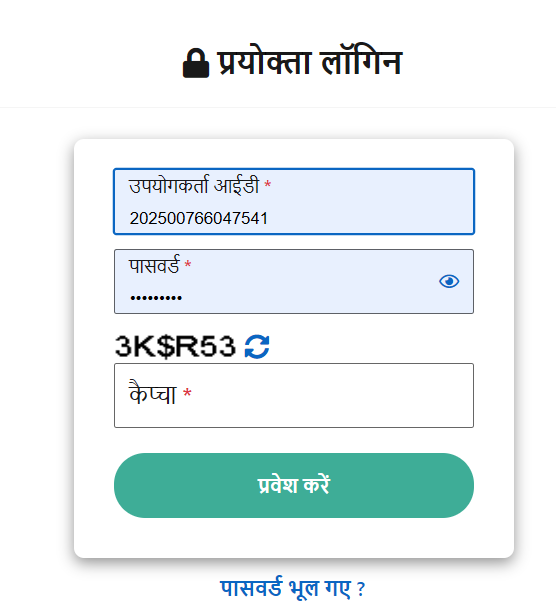
- Register/Login: Use your credentials or register with name, mobile number, and captcha.
- Fill Application Form: Enter details such as stamp duty payment receipt, transaction details, and reason for refund.
- Upload Documents: Submit stamp duty receipt, identity proof, and supporting documents (e.g., cancellation agreement).
- Pay Processing Fee: Pay any applicable fee (varies, typically nominal) via online payment.
- Submit Application: Review and submit the application.
- Receive Refund: Refunds are processed to the applicant’s bank account after verification.
4. Marriage Registration
IGRSUP facilitates online marriage registration for couples in Uttar Pradesh.
- Access the Portal: Go to https://igrsup.gov.in/.
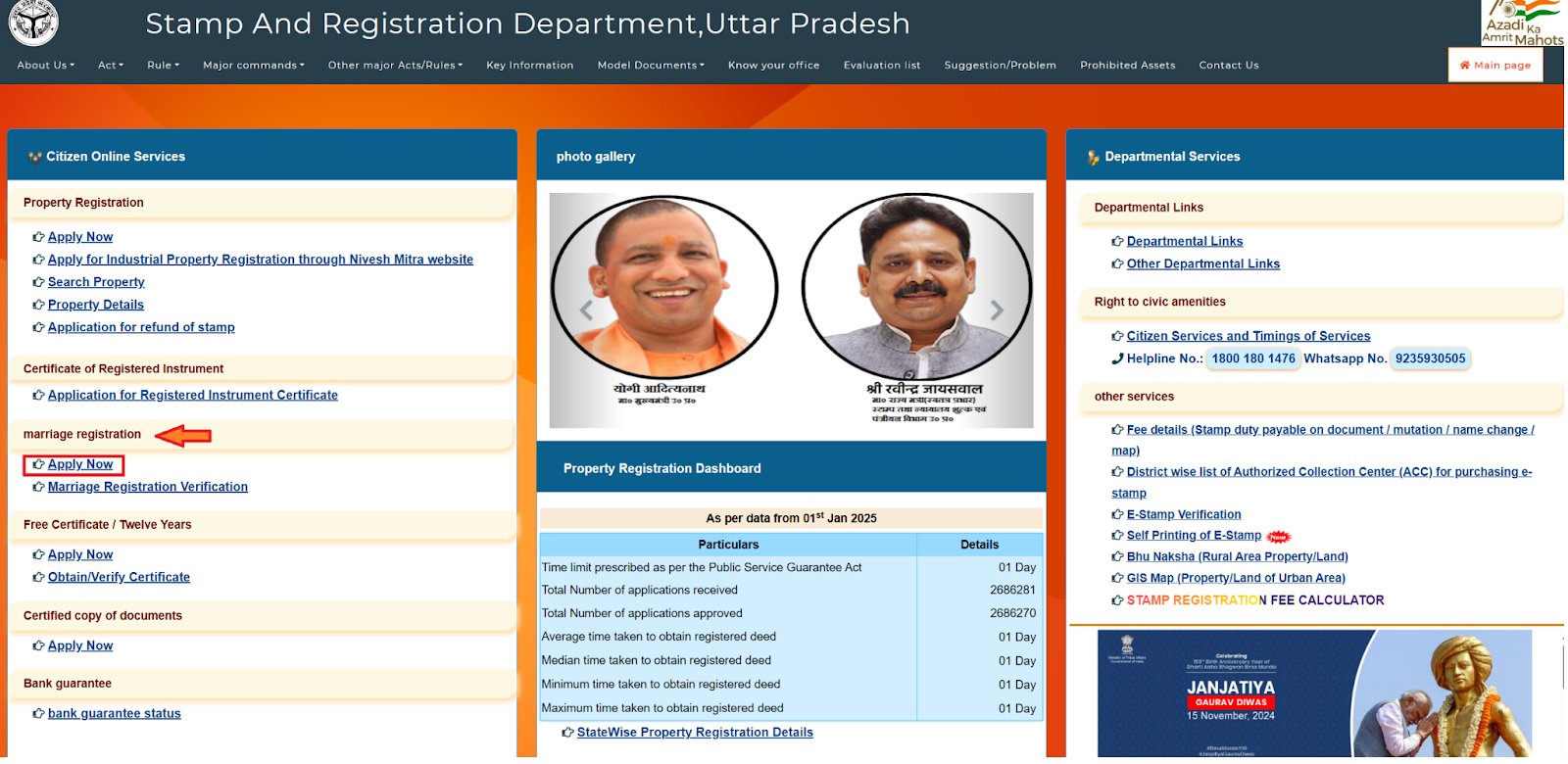
- Locate the Service: Find Marriage Registration under citizen services.
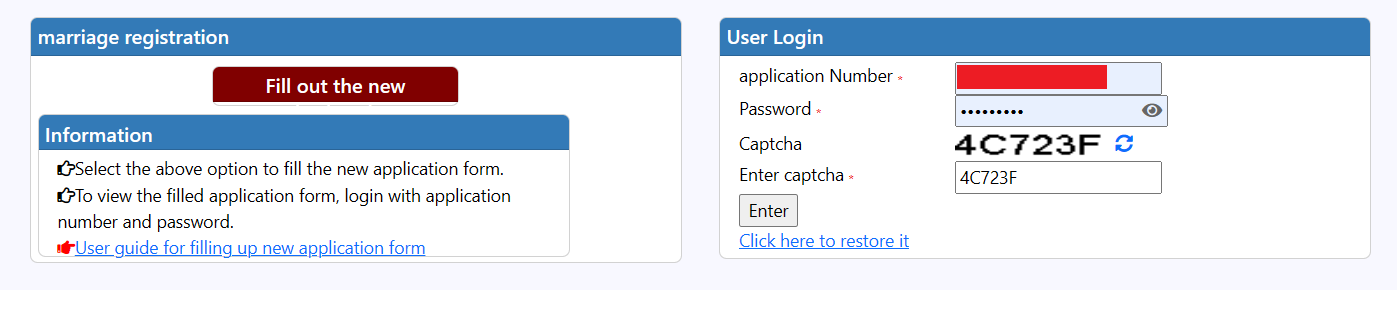
- Register/Login: Create an account or log in with existing credentials.
- Fill Application Form: Enter details of both parties (e.g., names, ages, addresses) and marriage details (e.g., date, place).
- Upload Documents: Submit marriage proof (e.g., certificate, affidavit), identity proofs (Aadhaar, PAN), and address proofs.
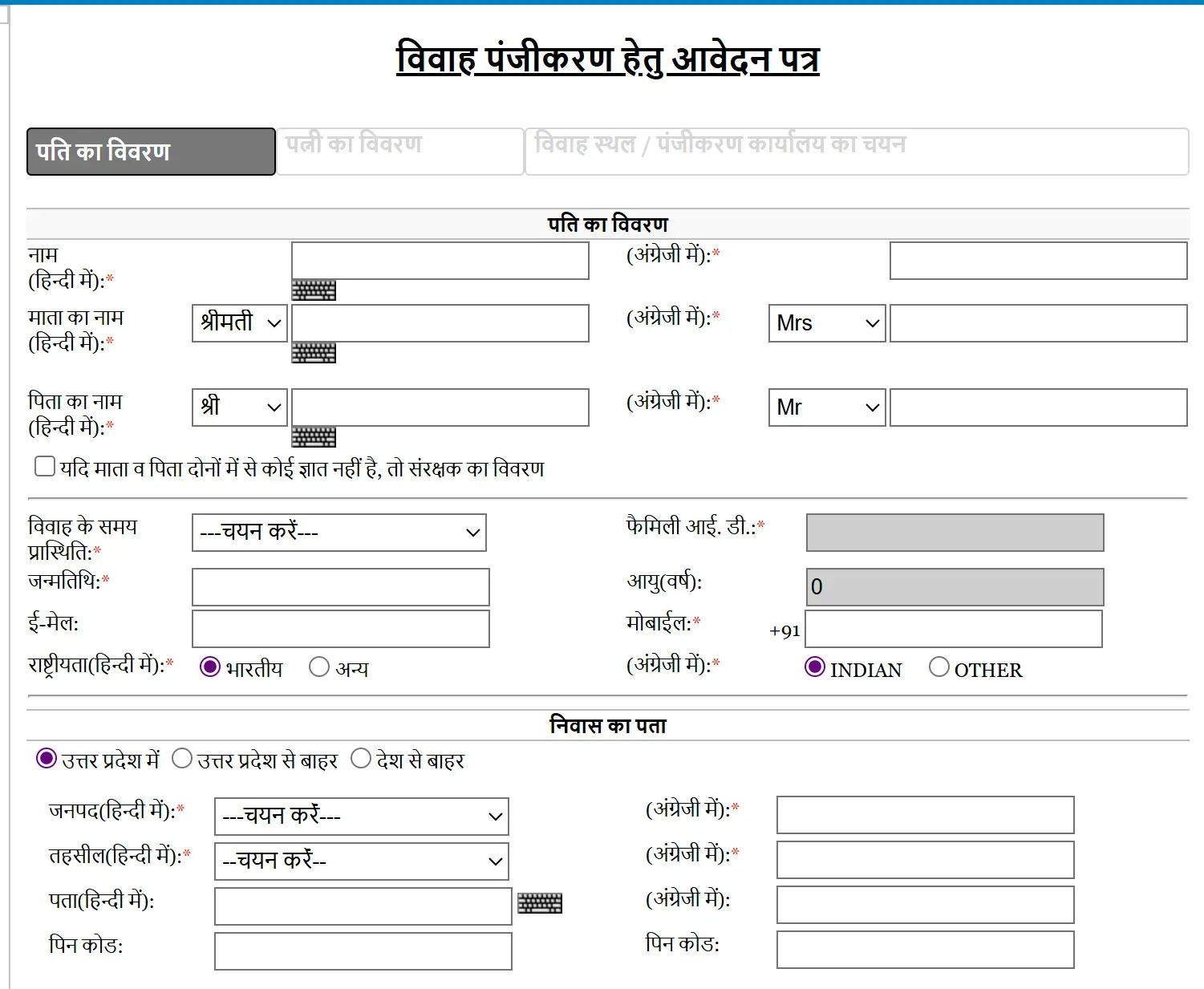
- Pay Fees: Pay the registration fee (typically ₹100–₹500, depending on the act under which the marriage is registered).
- Verify OTP: Enter the OTP sent to the registered mobile number (note: some users reported OTP issues in early 2025).
- Submit Application: Review and submit the application.
- Schedule Appointment: Book an appointment with the registrar office for verification, if required.
- Receive Certificate: Download the marriage certificate or collect it from the registrar office.
Valuation List (मूल्यांकन सूची)
- Visit Official Website: Open a browser and navigate to the official website of the Uttar Pradesh Stamp and Registration Department (https://igrsup.gov.in).
- Locate Valuation List Option: On the homepage, find and click the "मूल्यांकन सूची" (Valuation List) tab or link, typically under the services or e-services section.
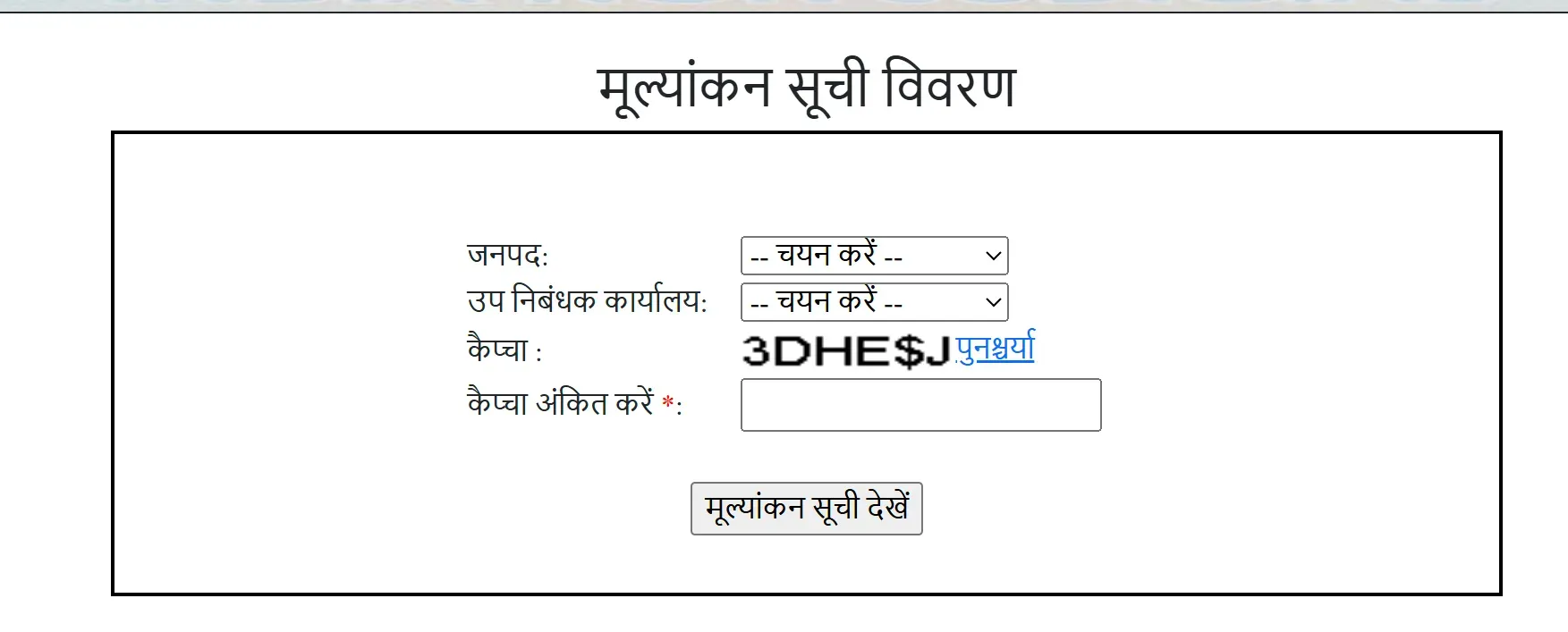
- Select Property Details:
- Choose the relevant district from the dropdown menu.
- Select the sub-registrar office associated with the property’s location.
- Specify the property type (e.g., residential, agricultural, or commercial).
- Enter Captcha: Input the displayed captcha code in the provided text box to verify you are not a bot.
- View and Download: Click the "मूल्यांकन सूची देखें" (View Valuation List) button. A PDF file containing the circle rate and related property details will be displayed and available for download.
E-Stamp Verification Process
- Access SHCIL Website: Open a browser and go to the Stock Holding Corporation of India Limited (SHCIL) website at www.shcilestamp.com.
- Select Verification Option: On the homepage, locate and click the "Verify e-Stamp Certificate" option, usually found in the main menu or under e-stamping services.
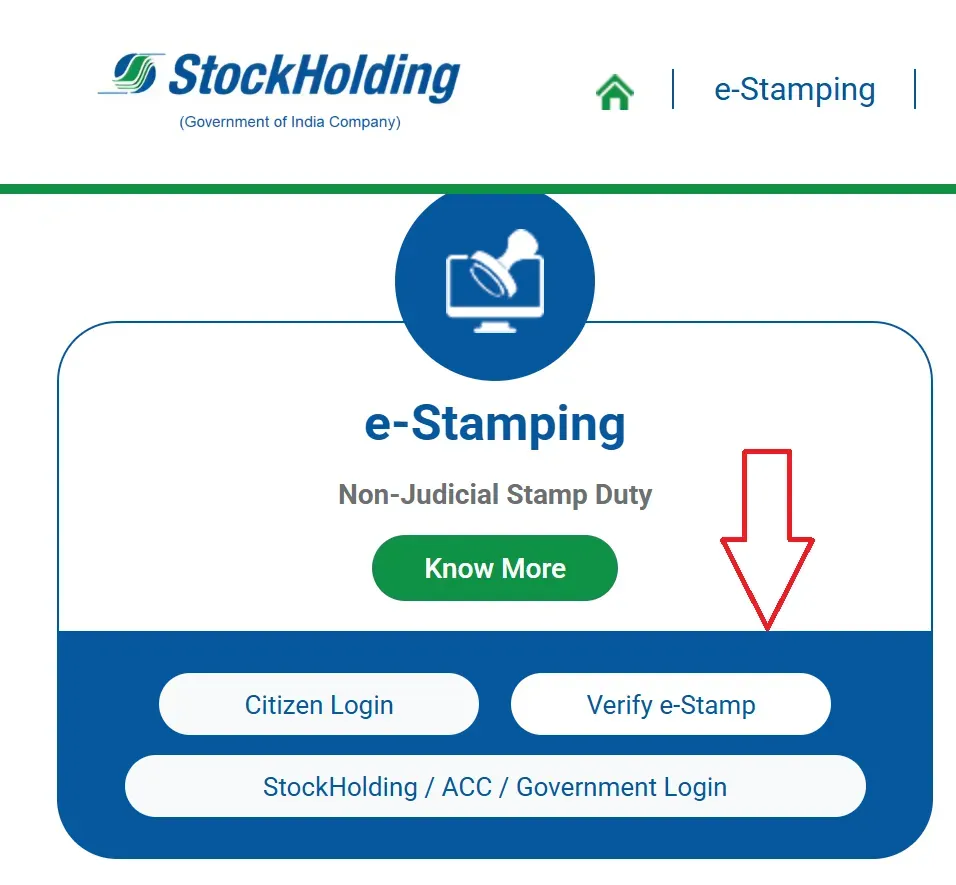
- Enter Required Details:
- State: Select "Uttar Pradesh" from the dropdown menu.
- Certificate Number: Input the unique e-stamp certificate number.
- Issue Date: Enter the date the e-stamp was issued.
- Session ID: Provide the session ID mentioned on the certificate.
- Submit for Verification: Click the "Verify" button to process the information.
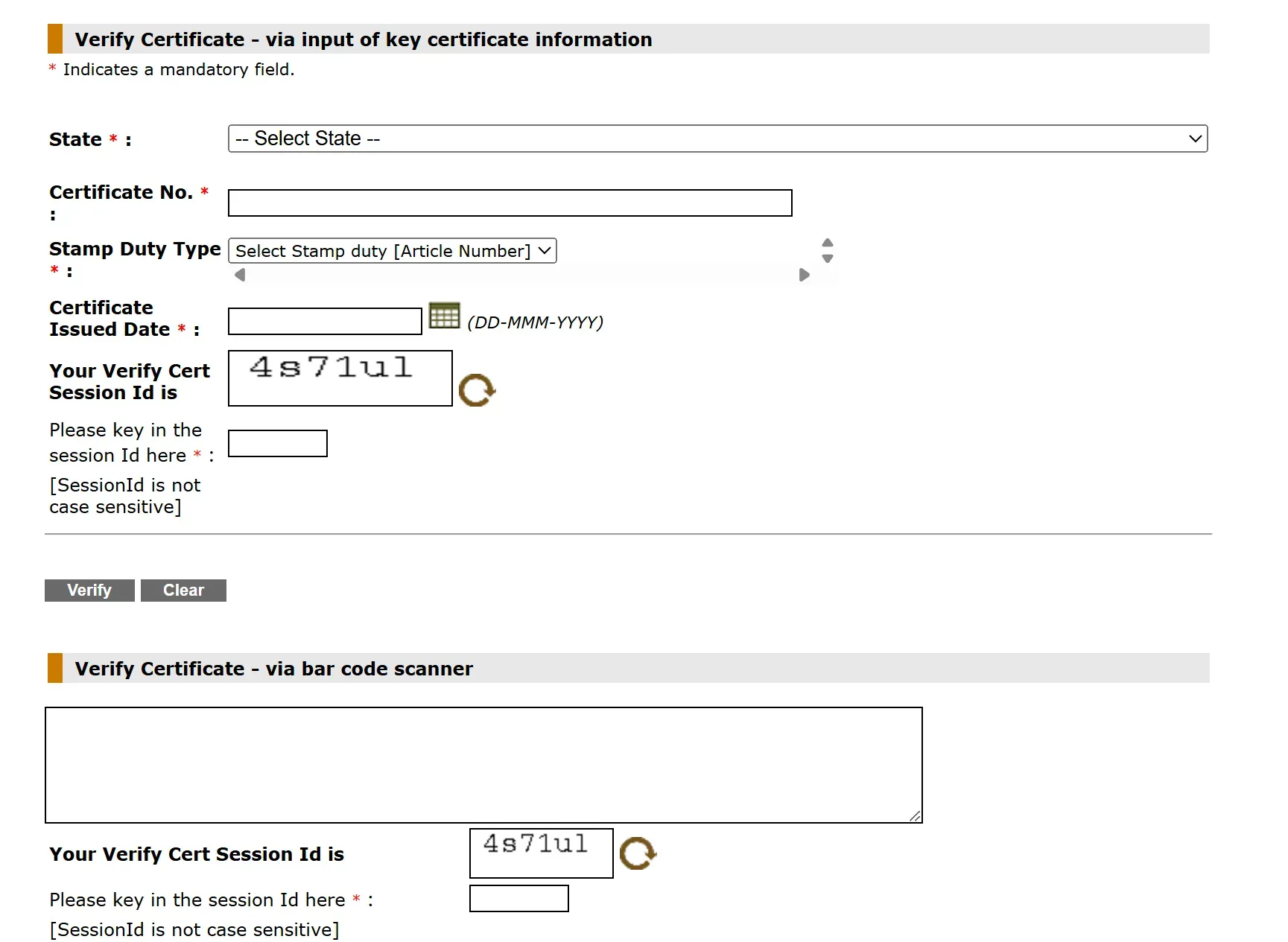
- Alternative Verification (QR Code): For e-stamp certificates issued after February 13, 2019, scan the QR code printed on the certificate using a QR code scanner on a smartphone or device to directly access verification details.
Upon successful verification, the system will display the e-stamp certificate’s authenticity, including details like certificate number, issue date, and stamp value. If the certificate is invalid or details are incorrect, an error message will appear.