
Bhulekh UP - Land Records (Khasra, Khatauni) | upbhulekh.gov.in
Bhulekh UP is an online portal launched by the Government of Uttar Pradesh, initiated by the Uttar Pradesh Revenue Department to digitize land records in the state and make them available to the public through a web portal.
This page offers guidance on how to access land records, including real-time Khatauni copies, and provides comprehensive details about the UP Bhulekh portal.
View Khatauni (Record of Rights) Copy
The Khatauni, also known as the Record of Rights, is a crucial land record document in Uttar Pradesh that provides details about land ownership, land category, and other relevant information.
Below is a step-by-step guide to accessing a copy of the Khatauni using the UP Bhulekh Portal:
- Access the UP Bhulekh Portal:
- Open your web browser and visit the official UP Bhulekh website at upbhulekh.gov.in.
- Ensure you have a stable internet connection to avoid interruptions during the process.
- Navigate to Khatauni Option:
- On the homepage, locate the section or menu option labeled "खतौनी (अधिकार अभिलेख) की नक़ल देखें" (View Khatauni Copy).
- Click on this option to proceed to the data entry page.
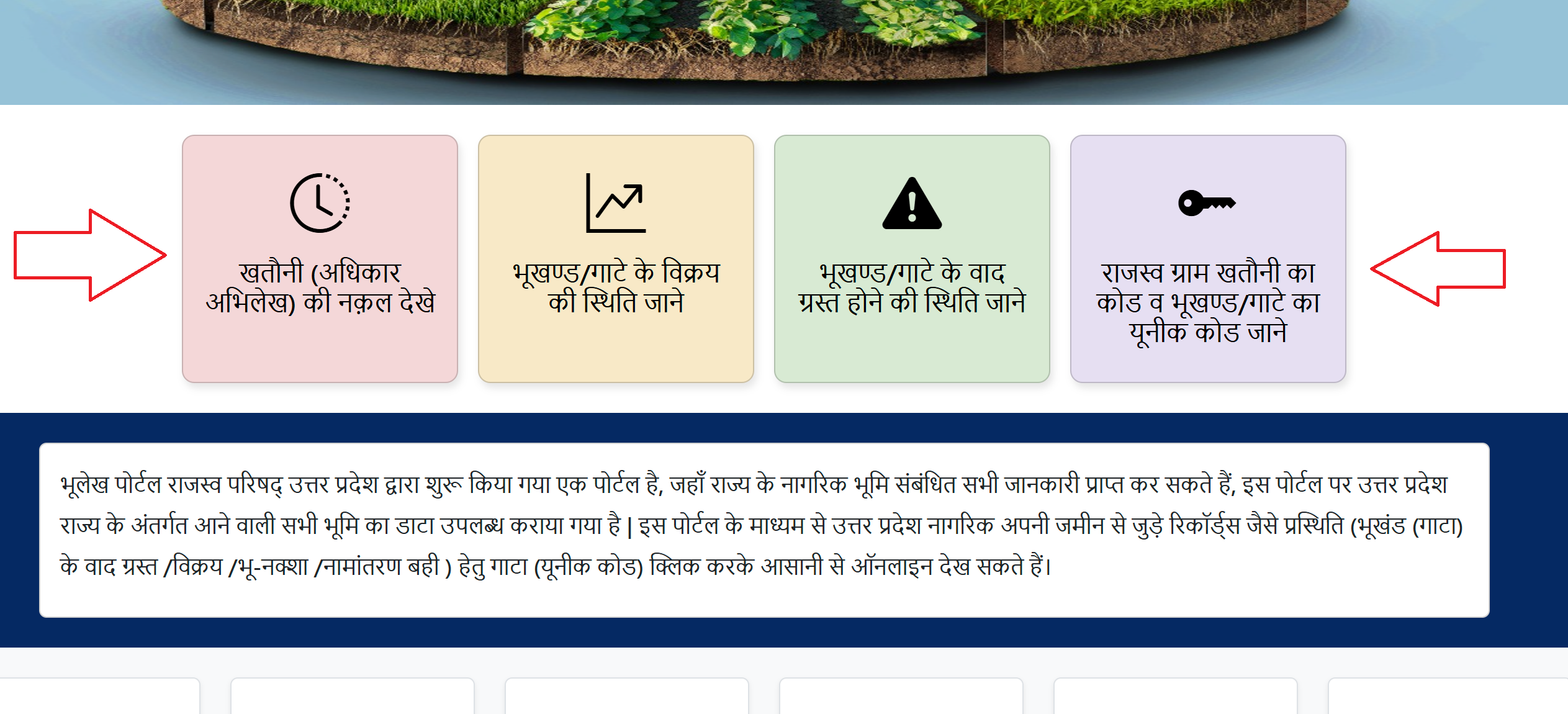
- Enter Location Details: A new page will appear prompting you to input specific location details to narrow down your search:
- District (जनपद): Select your district from the dropdown menu (e.g., Lucknow, Kanpur, etc.).
- Tehsil (तहसील): Choose the relevant tehsil (sub-district) under the selected district.
- Village (ग्राम): Select the village where the land is located.
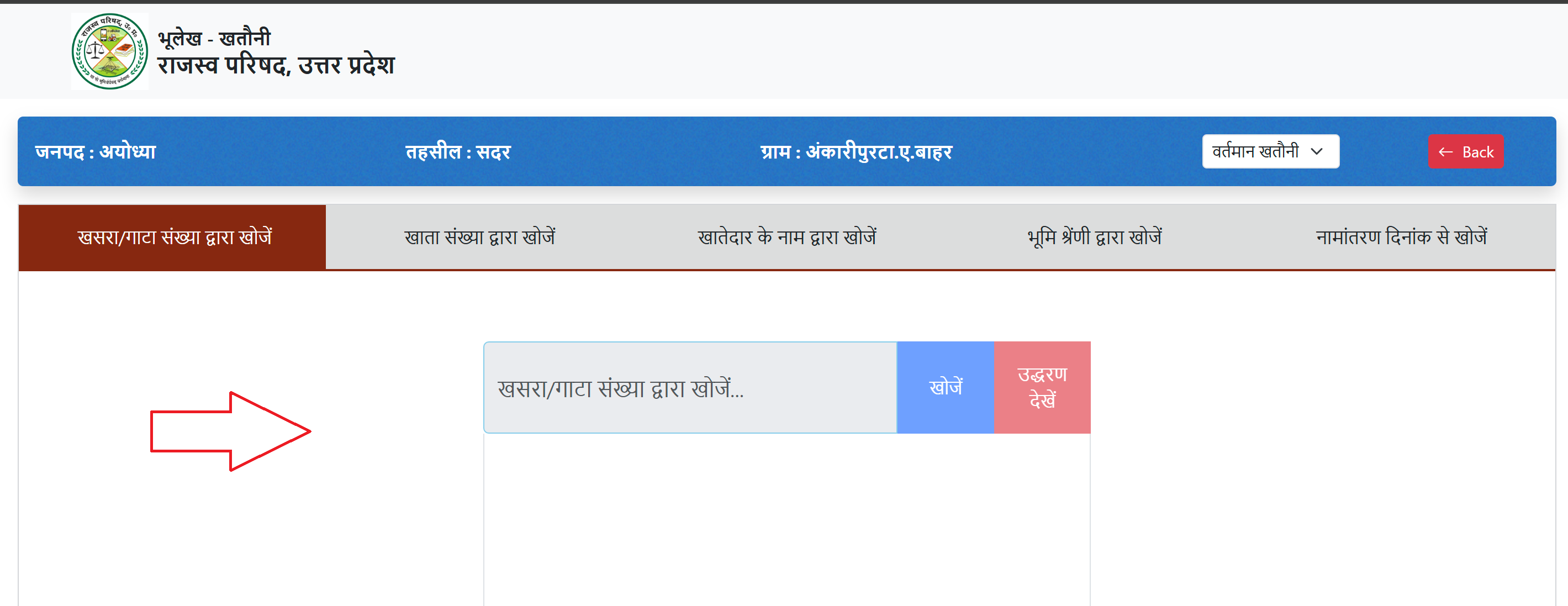
- Search for Khatauni: After entering the location details, a new page will display options to search for the Khatauni using one of the following criteria:
- Khasra/Gata Number (खसरा/गाटा संख्या): The unique identification number assigned to a specific plot of land.
- Khata Number (खाता संख्या): The account number associated with the landholder’s records.
- Khatedar’s Name (खातेदार का नाम): The name of the landholder or owner.
- Land Category (भूमि श्रेणी): The type or category of the land (e.g., agricultural, residential, etc.).
- Mutation Date (नामांतरण दिनांक): The date of any ownership transfer or mutation, if applicable.
- Choose one of these options, enter the relevant details, and click the "खोजें" (Search) button.
- View the Khatauni:
- Once the search is complete, a list or summary of matching records will appear.
- Click on the "उद्धरण देखें" (View Citation) option next to the relevant record to display the Khatauni details on the screen.
- The Khatauni will include details such as the owner’s name, land area, Khasra/Gata number, and other relevant information.
- Download or Print:
- After viewing the Khatauni, you can download it as a PDF file or print it directly from the portal for your records.
- Use the download or print icons typically available on the page to save a copy for official or personal use.
Check Sale Status of a Plot/Gata
To check whether a specific plot or Gata has been sold or transferred, follow these steps:
- Visit the UP Bhulekh Website: Go to upbhulekh.gov.in using a web browser.
- Select Sale Status Option: On the homepage, find and click on the option labeled "भूखण्ड/गाटे के विक्रय की स्थिति" (Check Sale Status of Plot/Gata).
- Enter Location Details: Select the following from the dropdown menus:
- District (जनपद): Choose the district where the plot is located.
- Tehsil (तहसील): Select the appropriate tehsil.
- Village (ग्राम): Pick the village where the plot is situated.
- Input Gata Number:
- Enter the Gata (Khasra) Number (गाटा/खसरा नंबर) of the plot you want to check.
- Verify the number to ensure accuracy.
- Search for Sale Status:
- Click the "खोजें" (Search) button to retrieve the details.
- The portal will display the relevant Gata details, including its current status.
- View Sale Status:
- Click on the "विक्रय प्रस्थिति" (Sale Status) button to view whether the plot has been sold or transferred.
- The status will indicate details such as the date of sale, buyer’s name (if applicable), or confirmation that no sale has occurred.
The sale status can be downloaded as a PDF or printed directly from the portal for record-keeping.
Check Dispute Status of a Plot/Gata
To determine if a plot or Gata is involved in any legal disputes, follow these steps:
- Visit the UP Bhulekh Website: Access upbhulekh.gov.in via a web browser.
- Select Dispute Status Option: On the homepage, locate and click on "भूखण्ड/गाटे के वाद ग्रस्त होने की स्थिति" (Check Dispute Status of Plot/Gata).
- Enter Location Details: Provide the following details:
- District (जनपद): Select the district.
- Tehsil (तहसील): Choose the tehsil.
- Village (ग्राम): Select the village where the plot is located.
- Search by Khasra/Gata Number:
- Enter the Khasra/Gata Number (खसरा/गाटा संख्या) of the plot.
- Double-check the number for accuracy.
- View Dispute Status:
- Click the "खोजें" (Search) button to retrieve the plot’s details.
- Select the "वाद ग्रस्त स्थिति" (Dispute Status) button to check if the plot is involved in any legal disputes.
- The portal will display whether the plot is dispute-free or list any ongoing legal issues.
You can download the dispute status as a PDF or print it directly from the portal for official use.
Find Revenue Village Khatauni Code and Unique Plot/Gata Code
To obtain the Khatauni code for a revenue village or the unique code for a plot/Gata, follow these steps:
- Visit the UP Bhulekh Website: Go to upbhulekh.gov.in.
- Select Khatauni Code Option: On the homepage, find and click on "राजस्व ग्राम खतौनी का कोड" (Revenue Village Khatauni Code).
- Enter Location and Plot Details: Choose the following from the dropdown menus:
- District (जिला): Select the district.
- Tehsil (तहसील): Pick the tehsil.
- Village (ग्राम): Select the village.
- Enter the Khasra/Gata Number (खसरा/गाटा नंबर) of the plot.
- Search for Codes:
- Click the "खोजें" (Search) button to retrieve the details.
- The portal will display the Revenue Village Khatauni Code and the Unique Plot/Gata Code associated with the entered details.
Bhu Naksha UP
To view the land map in Uttar Pradesh:
- Visit the official website: upbhunaksha.gov.in.
- Enter details like District, Village, and Tehsil to display the land map.
- For detailed land information, click on 'Show Land Details' for specifics such as plot type and ownership.
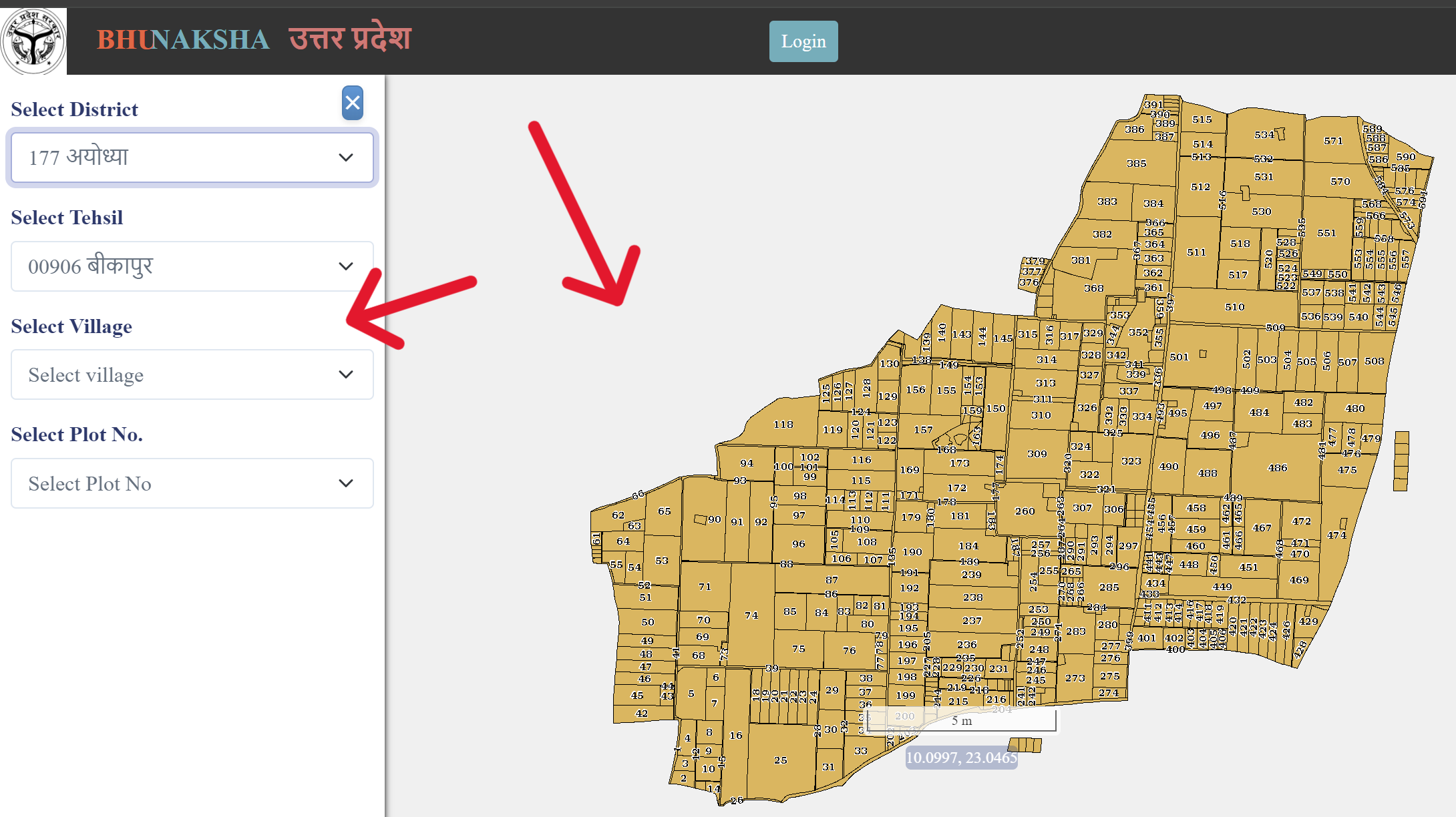
- Click on any plot number on the map for more details like plot size and owner information.
- To download the map, right-click on the screen and select ‘Save Image’.
Helpline
| UP Bhulekh Helpline | Contact Information |
|---|---|
| Email ID | bhulekh-up@gov.in |
| Office | Computer Cell, Revenue Board, Lucknow, Uttar Pradesh |
| Landline Number | +91-522-2217145 |
| Mobile Number | +91-7080100588 |