
Aadhaar - Download, Update, Enrolment, Status | UIDAI
Aadhaar is a 12-digit unique identity number available to all residents of India. It's based on biometrics (fingerprints, iris scans, and a picture of the person) and demographic data.
It's used for identification, banking, and accessing various government services. Aadhaar is the world's largest biometric ID system, managed by the Unique Identification Authority of India (UIDAI).
Update Aadhaar Details
Update proof of identity (PoI) or proof of address (PoA) documents. Free until 14/06/2026.
Check Status
Track Aadhaar enrollment or update status.
UIDAI
Get all official information related to Aadhaar.
My Aadhaar
Access Aadhaar services like download, update, and status checks.
UIDAI My Aadhaar Login
Access various Aadhaar-related services like updates, downloads, and status checks on the UIDAI My Aadhaar portal. Here's how to log in:
- Visit the Portal: Go to myaadhaar.uidai.gov.in.
- Click "Login": Find and select the login option on the homepage.
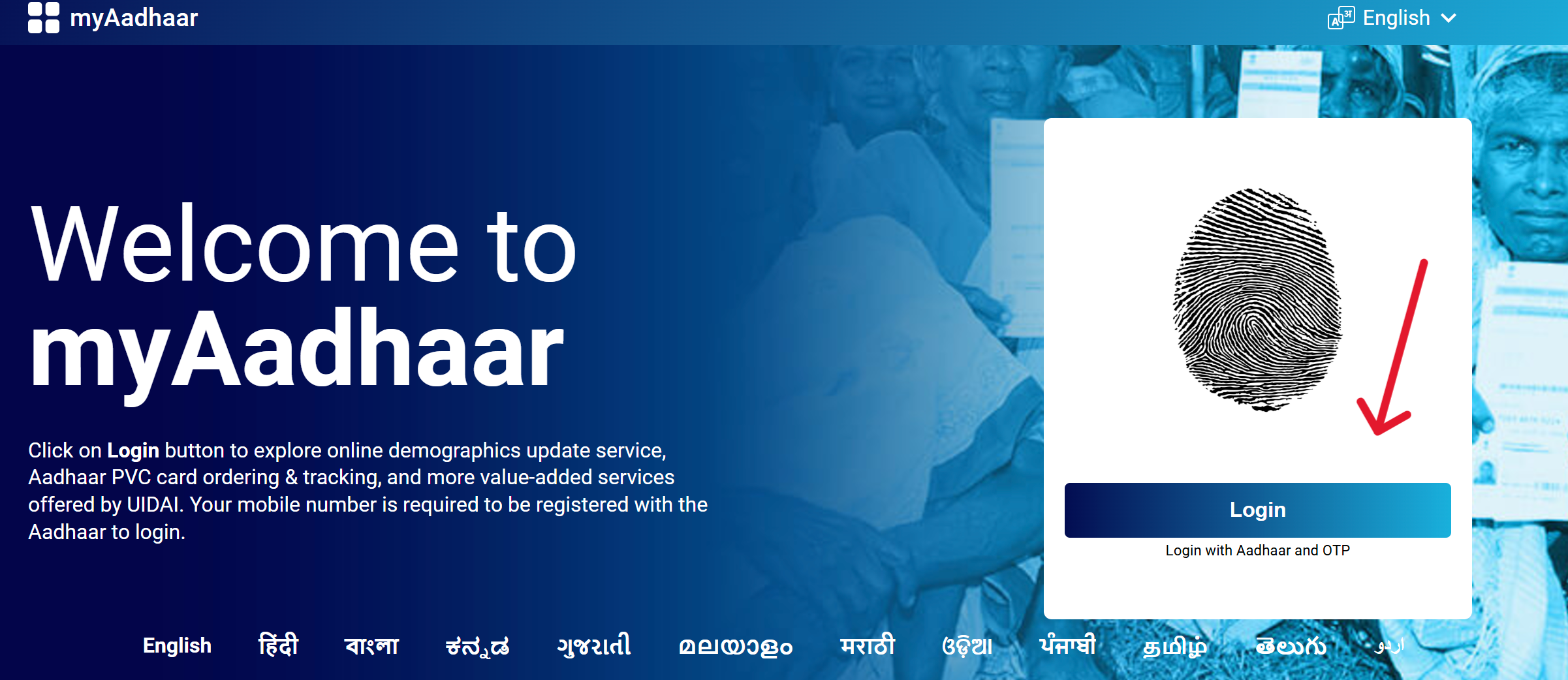
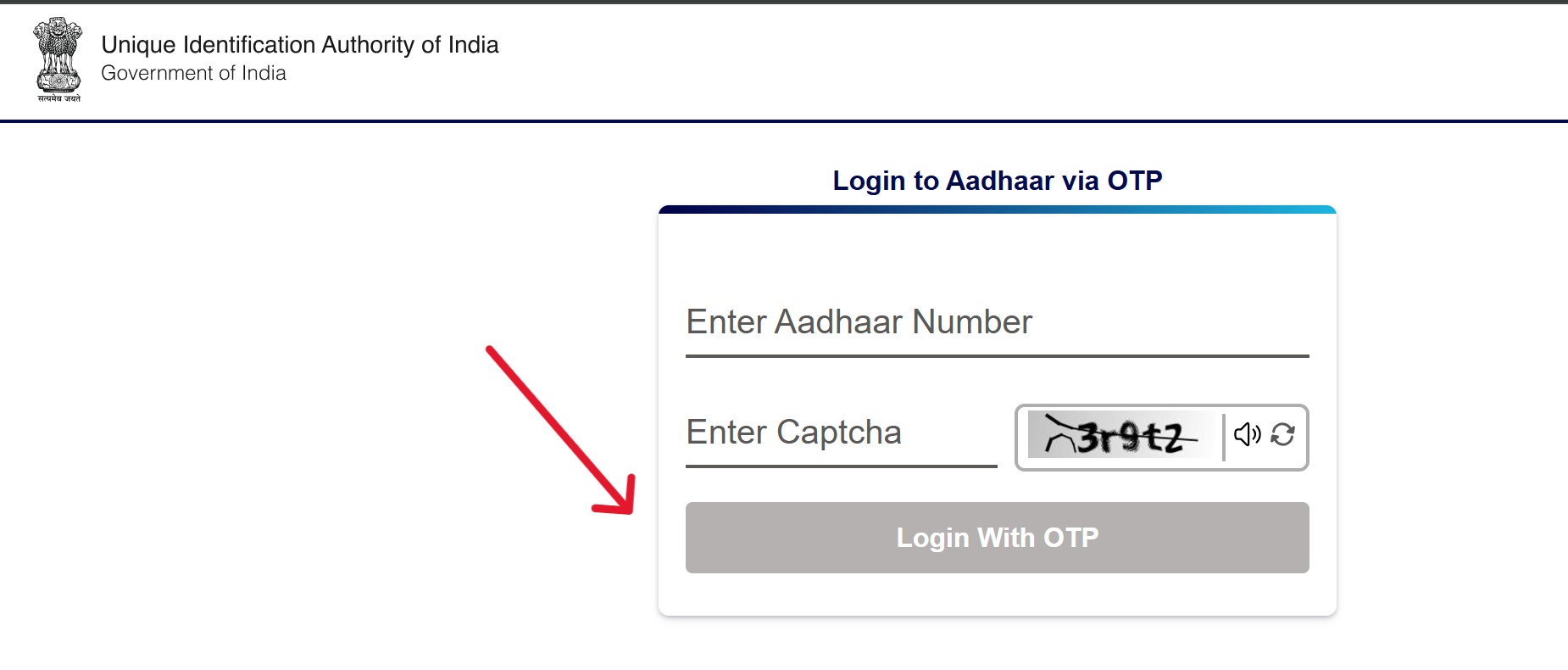
- Enter Details: Provide your Aadhaar number and captcha code.
- Receive OTP: Click "Send OTP" to get a one-time password on your registered mobile number.
- Login: Enter the OTP and click "Login" to access your Aadhaar Dashboard.
Download
Here is a step-by-step guide to downloading the Aadhar.
- First, go to the official website: https://myaadhaar.uidai.gov.in/.
- Then, click on the "Download Aadhaar" link.
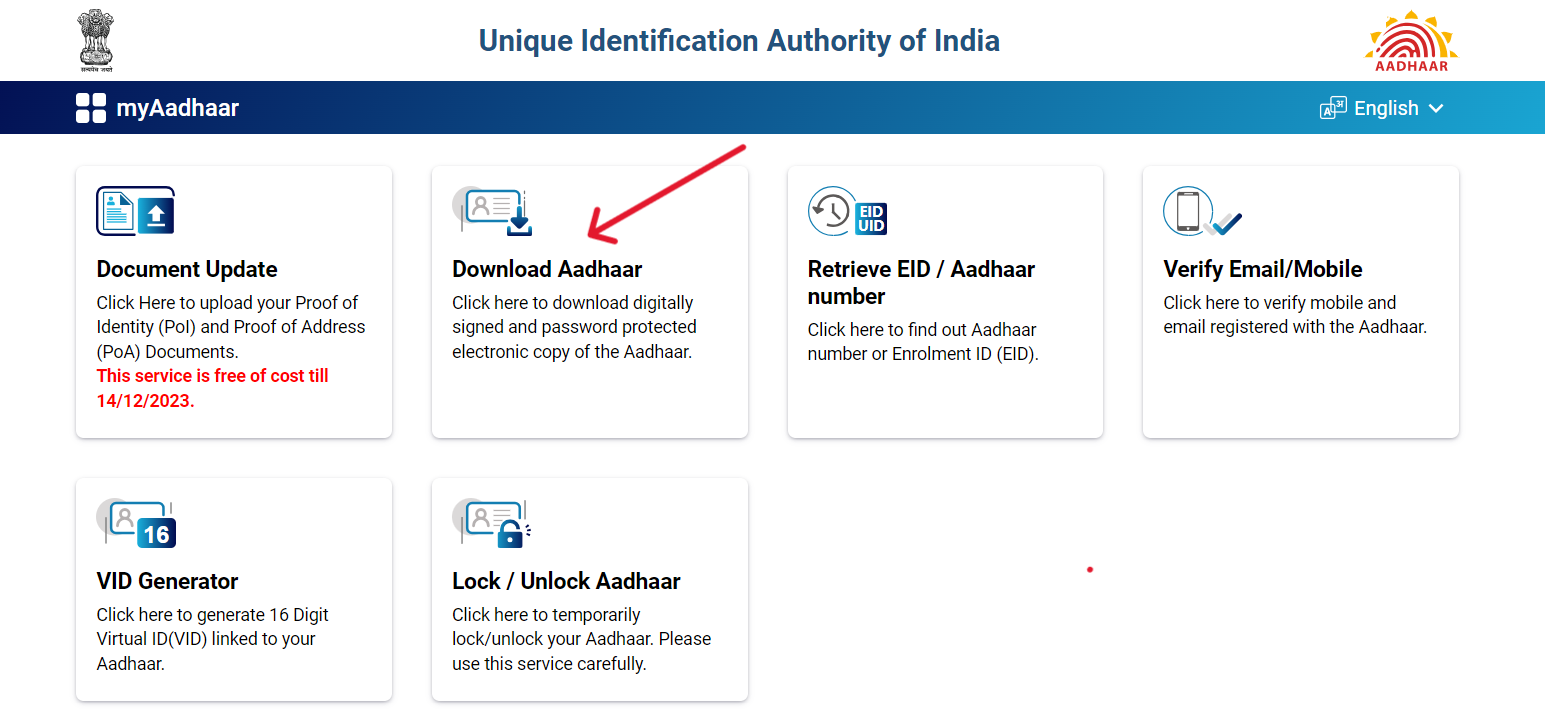
- On the "Download Aadhaar" page, you are required to choose an authentication method between Aadhaar Number, Enrollment ID, and Virtual ID.
- Enter Aadhaar Number/Enrollment ID Number/Virtual ID Number and captcha, then click on "Send OTP".
- An OTP will be sent to your registered mobile number.
- Enter OTP and click on "Verify and Download"; after that, the Aadhaar will start downloading on your device.
Update Aadhaar
Here is the step-by-step guide to update Aadhaar card:
- First, go to the official website: https://myaadhaar.uidai.gov.in/.
- Click on “Update Aadhaar” to update your Aadhaar information.
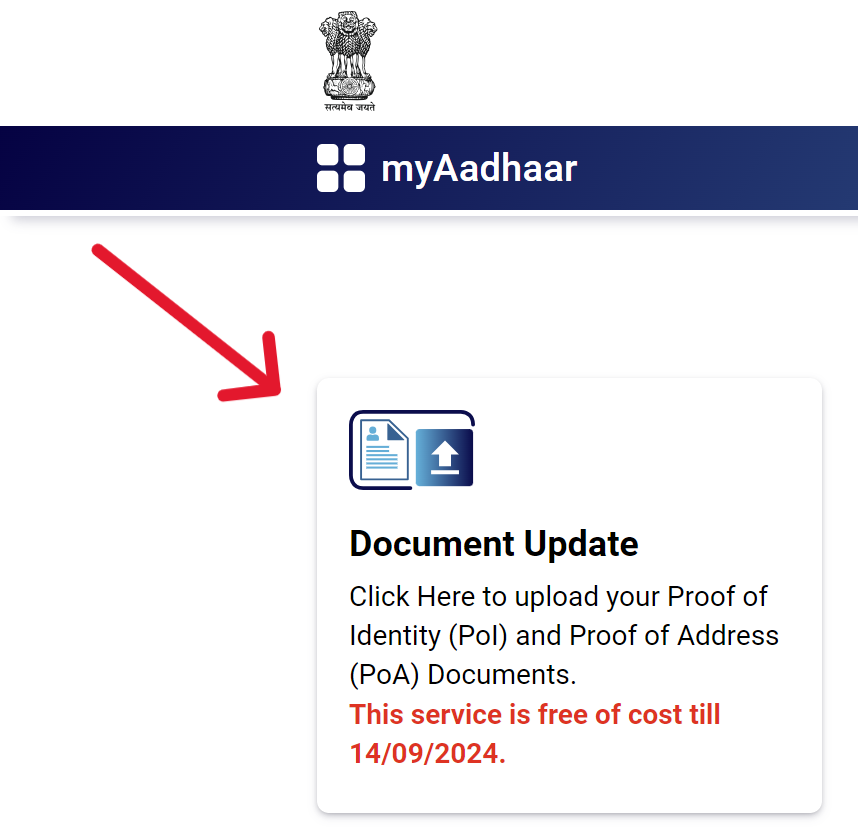
- Now, click on the "Click To Submit" option.
- On the new page, you should log in using your Aadhaar number and the captcha provided.
- Then, select the data you wish to update and click on ‘Proceed’.
- On the next page, upload the proof related to the data changes you have made.
- Confirm the information you have changed once again and click on submit.
- A few days after submission, your Aadhaar correction update will be processed, which you can check by downloading your Aadhaar card.
Check Aadhaar Status
Here is the step-by-step guide to check Aadhaar card status:
- First, go to the official website: https://myaadhaar.uidai.gov.in/.
- Now, click on the "Check Enrolment & Update Status" option available on the homepage.
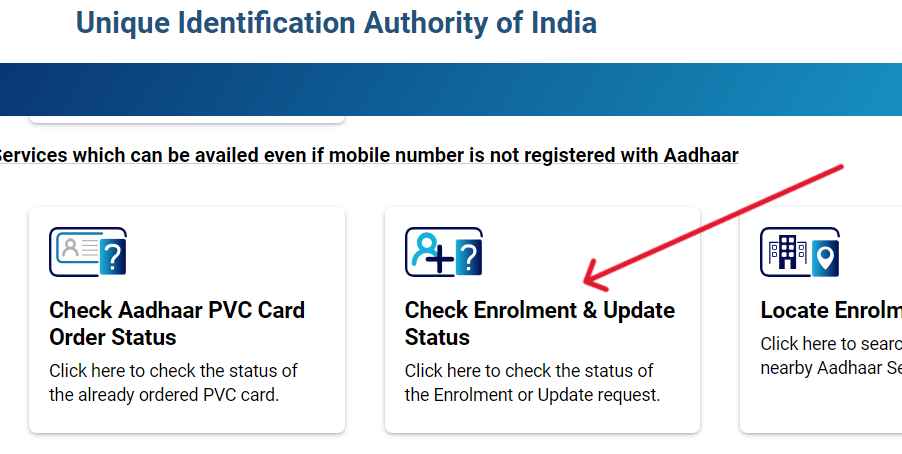
- On the "Check Enrolment & Update Status" page, you are required to choose an authentication method between Enrollment ID, SRN, and URN.
- Enter all the necessary details and the captcha code, then click on the 'Submit' button.
- After this, your Aadhaar Card Status will be displayed on your screen.
What is Aadhaar?
Aadhaar is a comprehensive identity system initiated by the Indian government, represented by a unique 12-digit number assigned to each resident of India. This unique identifier that records an individual's biometric (10 fingerprints, 2 iris scans, and facial photograph) and demographic data, which are stored in a secure centralized database.
Aadhaar is the world's largest biometric ID system, was launched on January 28, 2009, and is managed by the Unique Identification Authority of India (UIDAI), under the Ministry of Electronics and Information Technology.
Purpose/Benefits
- Identification: It provides a unique 12-digit number linked to an individual's biometrics, serving as a universal identity proof across India. It helps in eliminating duplicate and fake identities.
- Direct Benefit Transfer (DBT): Aadhaar ensures that government subsidies and benefits are directly transferred to the correct beneficiary's bank account, reducing fraud and improving efficiency.
- Insurance: Using Aadhaar accelerates the KYC process for obtaining insurance, reducing paperwork and fraud, and making insurance more accessible to a broader population.
- Bank Account: Aadhaar simplifies the process of opening bank accounts by serving as a comprehensive KYC document, promoting financial inclusion by allowing more people to access banking services.
Precautions
- Avoid leaving your Aadhaar letter, PVC Card, or any copies of them unattended.
- Refrain from sharing your Aadhaar details openly, especially on social media platforms like Twitter, Facebook, Instagram, etc., and other public forums.
- Do not disclose your Aadhaar OTP (One-Time Password) to any unauthorized individuals or entities.
- Use a masked Aadhaar to hide the first eight digits for secure verification.
- Never share your mAadhaar application PIN with anyone.
What is e-Aadhaar?
e-Aadhaar is a digital version of the Aadhaar card, which is an official, electronically signed document issued by the Unique Identification Authority of India (UIDAI).
It is as valid as the physical Aadhaar card and contains all the necessary details such as the Aadhaar number, photograph, and demographic information. This digital format ensures easy accessibility, portability, and convenience in carrying and sharing Aadhaar information securely.
What is UIDAI?
The Unique Identification Authority of India (UIDAI) is a statutory authority established under the provisions of The Aadhaar (Targeted Delivery of Financial and Other Subsidies, Benefits and Services) Act, 2016.
It was set up by the Government of India in January 2009 and operates under the Ministry of Electronics and Information Technology. The UIDAI's mandate is to issue a unique 12-digit identification number, known as Aadhaar, to all residents of India.
Key Functions and Responsibilities
- Issuance of UID Numbers: UIDAI is responsible for the generation and assignment of the unique Aadhaar numbers to Indian residents, which are linked to the individual's basic demographic and biometric information.
- Data Security and Management: The authority manages a centralized database that stores all the collected biometric and demographic data securely.
- Policy and Protocol Development: UIDAI develops policies, procedures, and systems for issuing Aadhaar numbers, updating resident information, and authenticating Aadhaar holders.
- Interlinking with Partner Databases: It defines mechanisms and processes for linking Aadhaar numbers with partner databases to streamline and secure service delivery.
- User Authentication: UIDAI provides an online platform for various agencies to authenticate the identity of Aadhaar holders as required for service provision.
Infrastructure and Operations
The UIDAI's data centers are located in Manesar and Bengaluru, housing around 7,000 servers to manage and protect the vast amount of data processed.
Since its inception, the UIDAI has aimed to ensure that Aadhaar numbers are robust enough to eliminate duplicate and fake identities and can be verified and authenticated in a cost-effective manner, anytime and anywhere.
The UIDAI plays a crucial role in improving service delivery and transparency in government and non-government services, contributing significantly to the digital infrastructure of India.
Vision
The UIDAI envisions empowering residents of India with a unique identity and a digital platform to authenticate themselves anytime, anywhere. This vision aims to provide a secure and inclusive environment that facilitates identity verification and enhances access to various services and benefits.
| Composition of UIDAI Authority | |||||
| Chairperson (Part-time) | Neelkanth Mishra | ||||
| CEO | Bhuvnesh Kumar | ||||
| Official Website | |||||